

__ __ ____ ___ __ _
/ / / /__ / / /___ / | ____ ____ ____ / /_(_)________ _
/ /_/ / _ \/ / / __ \ / /| |/ __ `/ _ \/ __ \/ __/ / ___/ __ `/
/ __ / __/ / / /_/ / / ___ / /_/ / __/ / / / /_/ / /__/ /_/ /
/_/ /_/\___/_/_/\____( ) /_/ |_\__, /\___/_/ /_/\__/_/\___/\__,_/
|/ /____/
How do you use Agentica?
- Install
agentica - Add your
AGENTICA_API_KEY
- creating an agentic function
- spawning an agent with the
spawnfunction
What can you use Agentica for?
Below are a few examples that we believe highlight some of the best features of Agentica!Grab and go
Install any prerequisites, copy and off you go.- Python
- TypeScript
Slack Bot: Let Agentica use an SDK
Slack Bot: Let Agentica use an SDK
- Run
pip install slack-sdkoruv add slack-sdk - Add your
SLACK_BOT_TOKEN
SLACK_BOT_TOKEN !import os
import asyncio
from agentica import agentic
from slack_sdk import WebClient
SLACK_BOT_TOKEN = os.environ.get("SLACK_BOT_TOKEN")
# We know we will want to list users and send a message
slack_conn = WebClient(token=SLACK_BOT_TOKEN)
send_direct_message = slack_conn.chat_postMessage
@agentic(send_direct_message, model="openai:gpt-4.1")
async def send_morning_message(user_name: str) -> None:
"""
Uses the Slack API to send a direct message to a user. Light and cheerful!
"""
...
if __name__ == "__main__":
import asyncio
asyncio.run(send_morning_message('@Samuel'))
print("Morning message sent!")
Data Scientist: Agentic data science in a Jupyter notebook
Data Scientist: Agentic data science in a Jupyter notebook
- Run
pip install matplotlib pandas ipynb jupyteroruv add matplotlib pandas ipynb jupyter - Download the CSV and save as
/movie_metadata.csv - Run
jupyter notebook data_science.ipynb
{
"cells": [
{
"cell_type": "code",
"execution_count": 1,
"metadata": {},
"outputs": [],
"source": [
"from agentica import spawn\n",
"import pandas as pd\n",
"import matplotlib.pyplot as plt\n"
]
},
{
"cell_type": "code",
"execution_count": 2,
"metadata": {},
"outputs": [],
"source": [
"agent = await spawn()\n",
"result = await agent.call(\n",
" dict[str, int],\n",
" \"Show the number of movies for each major genre. The results can be in any order.\",\n",
" movie_metadata_dataset=pd.read_csv(\"./movie_metadata.csv\").to_dict(),\n",
")"
]
},
{
"cell_type": "code",
"execution_count": null,
"metadata": {},
"outputs": [],
"source": [
"plt.figure(figsize=(12, 8))\n",
"plt.bar(list(result.keys()), list(result.values()))\n",
"plt.xticks(rotation=45, ha='right')\n",
"plt.tight_layout()\n",
"plt.show()\n"
]
},
{
"cell_type": "code",
"execution_count": 5,
"metadata": {},
"outputs": [],
"source": [
"result = await agent.call(\n",
" dict[str, int],\n",
" \"Update the result to only contain the genres that have more than 1000 movies.\",\n",
")"
]
},
{
"cell_type": "code",
"execution_count": null,
"metadata": {},
"outputs": [],
"source": [
"plt.figure(figsize=(12, 8))\n",
"plt.bar(list(result.keys()), list(result.values()))\n",
"plt.xticks(rotation=45, ha='right')\n",
"plt.tight_layout()\n",
"plt.show()\n"
]
}
],
"metadata": {
"kernelspec": {
"display_name": "Python 3 (ipykernel)",
"language": "python",
"name": "python3"
},
"language_info": {
"codemirror_mode": {
"name": "ipython",
"version": 3
},
"file_extension": ".py",
"mimetype": "text/x-python",
"name": "python",
"nbconvert_exporter": "python",
"pygments_lexer": "ipython3",
"version": "3.13.0"
}
},
"nbformat": 4,
"nbformat_minor": 4
}
Deep Research (Anthropic-style): Orchestrate Multi-Agent Systems in Agentica
Deep Research (Anthropic-style): Orchestrate Multi-Agent Systems in Agentica
- If on macOS, install system dependencies with
brew install pkg-config cairo meson ninja - Run
pip install exa-py validators markdown xhtml2pdf - Create an EXA account, create an
EXA_SERVICE_API_KEYand runexport EXA_SERVICE_API_KEY="<your-key-here>"
"""
Deep Research Demo - Multi-agent research with web search and citations.
"""
import asyncio
import json
import re
from dataclasses import dataclass, field
from datetime import datetime
from pathlib import Path
from typing import Literal
import markdown
from xhtml2pdf import pisa
from agentica.agent import Agent
from agentica.logging import AgentListener
from agentica.std.caption import CaptionLogger
from agentica.std.web import ExaAdmin, ExaClient, SearchResult
type SourceType = Literal[
"primary",
"secondary",
"vendor",
"press",
"blog",
"forum",
"unknown",
]
LEAD_RESEARCHER_MODEL = "anthropic:claude-opus-4.5"
SUBAGENT_MODEL = "anthropic:claude-sonnet-4.5"
CITATION_MODEL = "openai:gpt-4.1"
CITATION_PREMISE = """
You are a citation agent.
# Task
You must:
1. Review the research report provided to you as `research_report` line by line.
2. Identify which lines of the research report use information that could be from web search results.
3. List the web search results that were used in creating the research report.
4. For each of these lines, use the `load_search_result` function to load the web search result that was used.
5. Add a markdown citation with the URL of the web search result to the claim in the research report by modifying the `research_report` variable.
6. Once this is done, make sure the `research_report` is valid markdown - if not, change the markdown to make it valid.
7. Use the `save_report` function to save the research report to memory as a markdown file at the end.
8. Return saying you have finished.
# Rules
- Your citations MUST be consistent throughout the `research_report`.
- Any URL in the final markdown MUST be formatted as a markdown link, not a bare URL.
- You MUST use the `list_search_results` function to list the web search results that were used in creating the research report
- You MUST use the `load_search_result` function to load the web search results.
- You MUST use the `research_report` variable provided to you to modify the research report by adding citations.
- You MUST make sure the `research_report` is valid markdown.
- You MUST use the `save_report` function to save the research report to memory at the end.
- You MUST inspect the report before saving it to make sure it is valid and what you intended. Iterate until it is valid.
## Citation format
- Prefer inline citations like: `... claim ... ([source](https://example.com))`
- If multiple sources support a sentence, include multiple links: `... ([s1](...), [s2](...))`
"""
LEAD_RESEARCHER_PREMISE = """
You are a lead researcher. You have access to web-search enabled subagents.
# Task
You must:
1. Create a plan to research the user query.
2. Determine how many specialised subagents (with access to the web) are necessary, each with a different specific research task.
3. Call ALL subagents in parallel using asyncio.gather with return_exceptions=True so partial results are preserved.
4. Summarise the results of the subagents in a final research report as markdown. Use sections, sub-sections, list and formatting to make the report easy to read and understand. The formatting should be consistent and easy to follow.
5. Check the final research report, as this will be shown to the user.
6. Return the final research report using `return` at the very end.
# Rules
- Do NOT construct the final report until you have run the subagents.
- Do NOT return the final report in the REPL until planning, assigning subagents and returning the final report is complete.
- Do NOT add citations to the final research report yourself, this will be done afterwards.
- Do NOT repeat yourself in the final research report.
- You MUST raise an AgentError if you cannot complete the task with what you have available.
- You MUST check the final research report string before returning it to the user.
## Planning
- You MUST write the plan yourself.
- You MUST write the plan before assigning subagents to tasks.
- You MUST break down the task into small individual tasks.
## Subagents
- You MUST assign each small individual task to a subagent.
- For each task, YOU MUST create a **new** SubAgent, and provide it with a task via `.call()`.
- You MUST NOT assign multiple unrelated tasks to the same SubAgent.
- You should only call a SubAgent repeatedly if you feel you failed to get enough information from a single call, instructing them with what they were missing.
- You MUST instruct subagents to use the web_search and save_search_result functions if the task requires it.
- Do NOT ask subagents to cite the web, instead instruct them to use the save_search_result function.
- Subagents MUST be assigned independent tasks.
- IF after subagents have returned their findings more research is needed, you can assign more subagents to tasks.
- DO NOT try to preemptively *parse* the output of the subagents, **just look at the output yourself**.
- Subagents may fail! `asyncio.gather` will raise an exception if any of the subagents fail. Instead, you should pass `return_exceptions=True` to `asyncio.gather` to not lose the results of the successful subagents.
## Final Report
- Do NOT write the final report yourself without running subagents to do so.
- Do NOT add citations to the final research report yourself, this will be done afterwards by another agent.
- Do NOT repeat yourself in the final research report.
- Do NOT return a report with missing information, omitted fields or `N/A` values. If more work needs to be done, you must assign more subagents to tasks, or reuse the necessary subagents to extract more information.
- You MUST load the plan from memory before returning the final research report to check that you have followed the plan.
- You MUST check the final research report before returning it to the user.
- Check the final report for quality, completeness and consistency. If up to standard, return using a single `return` as the sole statement in its very own
- Your final report MUST include a short "Sources consulted" section:
- List each source URL you relied on
- Include its source_type and 1-2 extracted claims
- Any URL you include MUST be a markdown hyperlink (not a bare URL).
- Do NOT put the whole report in a table.
"""
SUBAGENT_PREMISE = """
You are a helpful assistant.
# Task
You must:
1. Construct a list of things to search for using the web_search function.
2. Execute ALL web_search calls in parallel using asyncio.gather and asyncio.run.
3. For each search result, `print()` relevant sections using SearchResult.content_with_line_numbers(start=..., end=...).
4. Identify which lines of content you are going to use in your report.
5. Use the save_search_result function to save the SearchResult to memory and include the lines of the content that you have used.
- Include the specific `query` you searched for.
- Include `extracted_claims`: a list of short claims you will rely on (derived from the saved lines).
- Include `source_type`: one of ["primary", "secondary", "vendor", "press", "blog", "forum", "unknown"].
Use your best judgment based on the URL/domain and the content.
- IMPORTANT: save_search_result returns a saved artifact path; keep it and include it in SourceInfo.artifact_path
6. Condense the search results into a single report with what you have found.
7. Return the report using `return` at the very end in a separate REPL session.
# Rules
- You MUST use `print()` to print the content of each search result by via SearchResult.content_with_line_numbers().
- You MUST use the web_search function if instructed to do so OR if the task requires finding information.
- Do NOT assume that the web_search function will return the information you need, you must go through the content of each search result line by line by combing through the content with SearchResult.content_with_line_numbers(start=, end=).
- Do NOT assume which lines of content you are going to use in your report, you must go through the content of each search result line by line via SearchResult.content_with_line_numbers(start=, end=).
- If you cannot find any information, do NOT provide information yourself, instead raise an error for the lead researcher in the REPL.
- You MUST save the SearchResult of any research that you have used to memory and include the lines of the content that you have used (are relevant).
- When saving, pass `query`, `extracted_claims`, and `source_type` to save_search_result.
- Your returned SubAgentReport MUST include `sources`: one entry per saved source, including url, source_type, query, extracted_claims, artifact_path, and lines_used.
- Return the report using `return` at the very end in a separate REPL session.
"""
STORAGE_DIR = Path("deep_research_test")
@dataclass
class Storage:
"""Centralized storage for all research artifacts."""
directory: Path = field(default=STORAGE_DIR)
_result_counts: dict[int, int] = field(default_factory=dict)
def __post_init__(self):
self.directory.mkdir(parents=True, exist_ok=True)
# Plan
def save_plan(self, plan: str) -> None:
"""Save the research plan."""
(self.directory / "plan.md").write_text(plan)
def load_plan(self) -> str:
"""Load the research plan."""
path = self.directory / "plan.md"
if not path.exists():
raise FileNotFoundError("Plan file not created yet.")
return path.read_text()
# Search Results
def save_search_result(
self,
subagent_id: int,
result: SearchResult,
lines_used: list[tuple[int, int]],
*,
query: str | None = None,
extracted_claims: list[str] | None = None,
source_type: SourceType | None = None,
source_notes: str | None = None,
) -> str:
count = self._result_counts.get(subagent_id, 0) + 1
self._result_counts[subagent_id] = count
path = self.directory / f"subagent_{subagent_id}" / f"result_{count}.json"
path.parent.mkdir(parents=True, exist_ok=True)
# Extract only the relevant lines
filtered_lines: list[str] = []
for start, end in lines_used:
filtered_lines.extend(result.content_lines[start - 1 : end])
data = {
"title": result.title,
"url": result.url,
"content_lines": filtered_lines,
"score": result.score,
# Rich artifact metadata (kept compatible with SearchResult.load()).
"saved_at": datetime.now().isoformat(),
"subagent_id": subagent_id,
"query": query,
"lines_used": lines_used,
"extracted_claims": extracted_claims or [],
"source_type": source_type,
"source_notes": source_notes,
}
path.write_text(json.dumps(data))
return str(path)
def load_search_result(self, path: str) -> SearchResult:
"""
Load a previously saved search-result artifact (JSON) and return it as a SearchResult.
Note: artifacts may include extra metadata fields, but SearchResult.load() only uses:
- title
- url
- content_lines
- score
"""
p = Path(path)
if not p.is_relative_to(self.directory):
raise ValueError(f"Path must be within {self.directory}")
return SearchResult.load(p)
def list_search_results(self) -> list[str]:
"""List all saved search result paths."""
files: list[str] = []
for subagent_dir in self.directory.glob("subagent_*"):
if not subagent_dir.is_dir():
continue
for file in subagent_dir.iterdir():
if file.suffix == ".json" and re.match(r"^result_\d+$", file.stem):
files.append(str(file))
return files
# Report
def save_report(self, md_report: str) -> str:
"""Save the final report as markdown and PDF."""
md_path = self.directory / "report.md"
pdf_path = self.directory / "report.pdf"
md_path.write_text(md_report)
try:
html = markdown.markdown(md_report, extensions=['tables'])
with pdf_path.open("wb") as pdf:
pisa.CreatePDF(html, dest=pdf)
except Exception as e:
print(f"Warning: PDF conversion failed: {e}")
return str(pdf_path)
@property
def report_path(self) -> Path:
return self.directory / "report.pdf"
def report_exists(self) -> bool:
return (self.directory / "report.md").exists()
# Summary
def summary(self) -> str:
"""Return a summary of all stored artifacts."""
lines = [
"",
"━" * 40,
f"📁 Research stored in: {self.directory.resolve()}",
"━" * 40,
]
if self.report_exists():
lines.append(f"📄 Report: {self.report_path.name}")
if (self.directory / "report.md").exists():
lines.append(f" {(self.directory / 'report.md').name}")
if (self.directory / "plan.md").exists():
lines.append("📋 Plan: plan.md")
search_results = self.list_search_results()
if search_results:
lines.append(f"🔍 Search results: {len(search_results)} files")
by_subagent: dict[str, list[str]] = {}
for path in search_results:
p = Path(path)
subagent = p.parent.name
by_subagent.setdefault(subagent, []).append(p.name)
for subagent, files in sorted(by_subagent.items()):
lines.append(f" {subagent}/: {len(files)} results")
lines.append("━" * 40)
return "\n".join(lines)
storage = Storage()
class SubAgent:
"""
A subagent with web search capabilities.
For each task, a subagent must be **created**, then **run** with `.call()`.
If a subagent needs to be reused, perhaps because it got something wrong, it
may be run **again** with a second `.call()`, persisting its history.
"""
_id: int
_exa: ExaClient | None
_agent: Agent
_initialized: bool
def __init__(self):
self._id = 0
self._exa = None
async def web_search(query: str) -> list[SearchResult]:
"""Tool: search the web for `query`. Returns a small list of SearchResult objects."""
print(f"Searching: {query}")
await self._ensure_init()
assert self._exa is not None
return await self._exa.search(query, num_results=2)
def save_search_result(
result: SearchResult,
lines_used: list[tuple[int, int]],
query: str | None = None,
extracted_claims: list[str] | None = None,
source_type: SourceType | None = None,
source_notes: str | None = None,
) -> str:
"""
Tool: save a SearchResult artifact for later citation/inspection.
Parameters
----------
result:
The SearchResult you are using.
lines_used:
1-indexed (inclusive) line ranges from result.content_lines that support your claims.
query:
The web query you used to find this result (optional but recommended).
extracted_claims:
Short bullet claims you will rely on, derived from the saved lines.
source_type:
Optional coarse label, e.g. "primary", "secondary", "vendor", "press", "blog", "forum", "unknown".
source_notes:
Optional brief notes justifying the label / quality.
Returns
-------
str:
Path to the saved JSON artifact (within the storage directory).
"""
return storage.save_search_result(
self._id,
result,
lines_used,
query=query,
extracted_claims=extracted_claims,
source_type=source_type,
source_notes=source_notes,
)
self._agent = Agent(
model=SUBAGENT_MODEL,
premise=SUBAGENT_PREMISE,
scope=dict(
web_search=web_search,
save_search_result=save_search_result,
SearchResult=SearchResult,
SubAgentReport=SubAgentReport,
SourceInfo=SourceInfo,
),
)
self._initialized = False
async def _ensure_init(self) -> None:
if self._initialized:
return
self._initialized = True
# Get agent ID from listener
await self._agent._ensure_init()
if (listener := self._agent._listener) and listener.logger.local_id:
self._id = int(listener.logger.local_id)
else:
raise ValueError("Agent listener not found")
# Create ephemeral Exa API key for this subagent
admin = ExaAdmin()
key_name = f"SubAgent_{self._id}"
api_key = await admin.create_key(key_name)
print(f"Created Exa API key for subagent {self._id}: {api_key[:4]}...{api_key[-4:]}")
self._exa = ExaClient(api_key=api_key)
async def call(self, task: str) -> 'SubAgentReport':
"""Run the subagent on a task."""
await self._ensure_init()
print(f"Running web-search subagent ({self._id})")
with CaptionLogger():
return await self._agent.call(SubAgentReport, task)
@dataclass
class SourceInfo:
"""
A single source you used in your research.
Fill this out in your SubAgentReport so the coordinator can understand:
- what URL you relied on,
- what you searched for to find it,
- what claims you are taking from it,
- and an approximate source category (primary/secondary/vendor/press/blog/forum/unknown).
"""
url: str
source_type: SourceType | None = None
query: str | None = None
extracted_claims: list[str] = field(default_factory=list)
artifact_path: str | None = None
lines_used: list[tuple[int, int]] = field(default_factory=list)
@dataclass
class SubAgentReport:
"""
Your final output for one subagent task.
Requirements:
- `content` may be paraphrased, but MUST be supported by the saved `lines_used`.
- `sources` must include one SourceInfo per source you relied on.
"""
title: str
content: str
sources: list[SourceInfo] = field(default_factory=list)
class CitationAgent:
"""Agent that adds citations to a research report."""
def __init__(self):
self._agent = Agent(
model=CITATION_MODEL,
premise=CITATION_PREMISE,
scope=dict(
list_search_results=storage.list_search_results,
load_search_result=storage.load_search_result,
save_report=storage.save_report,
),
)
async def call(self, md_report: str) -> None:
"""Add citations to a research report."""
print("Running citation agent")
return await self._agent.call(
None,
f"The `research_report = '{md_report[:10]}...' [truncated]` has been provided to you in the REPL.",
research_report=md_report,
)
class DeepResearchSession:
"""Orchestrates a deep research session with multiple agents."""
def __init__(self):
self._lead_researcher = Agent(
model=LEAD_RESEARCHER_MODEL,
premise=LEAD_RESEARCHER_PREMISE,
scope=dict(
save_plan=storage.save_plan,
load_plan=storage.load_plan,
list_search_results=storage.list_search_results,
load_search_result=storage.load_search_result,
SubAgent=SubAgent,
SubAgentReport=SubAgentReport,
SourceInfo=SourceInfo,
SearchResult=SearchResult,
),
listener=lambda: AgentListener(CaptionLogger("Lead Researcher")),
)
self._citation_agent = CitationAgent()
async def call(self, query: str) -> str:
"""Run the deep research process."""
try:
# Research phase
report = await self._lead_researcher.call(str, query)
# Citation phase
with CaptionLogger():
await self._citation_agent.call(report)
if not storage.report_exists():
raise RuntimeError("Report was not created")
print(storage.summary())
return f"Check out the research report at {storage.report_path}. Ask me any questions!"
finally:
# Clean up ephemeral API keys
print("Pruning Exa API keys...")
deleted = await ExaAdmin().prune_keys(prefix="SubAgent_")
if deleted:
print(f"Pruned {deleted} key(s)")
if __name__ == "__main__":
session = DeepResearchSession()
result = asyncio.run(
session.call(
"What are all of the companies in the US working on AI agents in 2025? "
"Make a list of at least 10. For each, include the name, website and product, "
"description of what they do, type of agents they build, and their vertical/industry."
)
)
print(result)
Slack Bot: Let Agentica use an SDK
Slack Bot: Let Agentica use an SDK
- Install Agentica and run
npx agentica-setup, choosing Plain TS. - Run
npm add @slack/web-api(or usepnpm,bun) - Add your
SLACK_BOT_TOKEN
SLACK_BOT_TOKEN !import { agentic } from '@symbolica/agentica';
import { WebClient } from '@slack/web-api';
const SLACK_BOT_TOKEN = 'YOUR-TOKEN-HERE';
// Initialize Slack client
const slackClient = new WebClient(SLACK_BOT_TOKEN);
/** Post message
* @param userName The name of the user to send a morning message to
*/
async function postMessage(userName: string, text: string): Promise<void> {
await slackClient.chat.postMessage({
channel: `@${userName}`,
text: text,
});
}
/**
* Uses the Slack API to send the user a direct message. Light and cheerful!
* @param userName The name of the user to send a morning message to
*/
async function sendMorningMessage(userName: string): Promise<void> {
await agentic<void>('Use the Slack API to send the user a direct message. Light and cheerful!', {
postMessage,
userName,
});
}
// Execute the function
void sendMorningMessage('John Smith');
Multi-language translation: Create multi-agent streaming UI components
Multi-language translation: Create multi-agent streaming UI components
- Install Agentica and run
npx agentica-setup, choosing Plain TS. - Run
npm add ink ink-text-input react @types/react tsx - Run
node dist/translation.js
Backend: Translator agents and coordinator
Backend: Translator agents and coordinator
import { Agent, spawn } from '@symbolica/agentica';
/**
* Represents a single language translator agent
*/
export class Translator {
id: string;
language: string;
private agent: Agent | null = null;
onProgress?: (chunk: string) => void;
constructor(id: string, language: string) {
this.id = id;
this.language = language;
}
async initialize(): Promise<void> {
this.agent = await spawn({
system: `You are an expert ${this.language} translator.
Your task is to provide a single best translation of the user's text into ${this.language}.
STRICT RULES:
- Return ONLY the best-effort translated text.
- Do NOT add explanations, notes, or any extra words.
- Do NOT mention dialects or alternatives.
- Do NOT ask clarifying questions.
- Do NOT use any English, or any other language other than the requested target language in your response.
- Be natural and idiomatic, but concise.
- Preserve meaning precisely as best you can without adding ANY context.`,
model: 'openai:gpt-4.1',
});
}
async translate(text: string): Promise<string> {
if (!this.agent) {
throw new Error(`Translator ${this.id} not initialized`);
}
// Use local variable so transformer can handle it
const agent = this.agent;
let result: string = await agent.call<string>(
`Translate the text into "${this.language}". Respond with ONLY the best-effort translated text with NO additional context.\n\n${text}`,
{
text,
language: this.language,
},
{
listener: (iid: string, chunk: { content?: string; role?: string }) => {
// Only forward agent-generated content, not system/user messages
if (this.onProgress && chunk && chunk.content && chunk.role === 'agent') {
this.onProgress(chunk.content);
}
},
}
);
// Post-process to enforce strict output
result = (result ?? '').trim();
// Strip code fences and labels like "Translation:" or language prefixes
result = result
.replace(/^```[a-z]*\n([\s\S]*?)\n```$/i, '$1')
.replace(/^\s*(translation\s*:\s*)/i, '')
.replace(new RegExp(`^\s*(${this.language})\s*:\s*`, 'i'), '')
.trim();
// Remove surrounding quotes if model added them
if ((result.startsWith('"') && result.endsWith('"')) || (result.startsWith("'") && result.endsWith("'"))) {
result = result.slice(1, -1).trim();
}
return result;
}
async close(): Promise<void> {
if (this.agent) {
await this.agent.close();
}
}
}
/**
* Coordinates multiple translator agents working in parallel
*/
export class TranslationManager {
private translators: Map<string, Translator> = new Map();
// Callbacks for UI updates
onTranslatorSpawned?: (id: string, language: string) => void;
onTranslatorProgress?: (id: string, chunk: string) => void;
onTranslatorComplete?: (id: string, translation: string) => void;
async translateToMany(text: string, languages: string[]): Promise<Map<string, string>> {
// Phase 1: Create and initialize all translators in parallel
const initPromises = languages.map(async (language, index) => {
const id = `translator_${index}`;
const translator = new Translator(id, language);
// Set up progress callback
translator.onProgress = (chunk: string) => {
this.onTranslatorProgress?.(id, chunk);
};
// Initialize the translator
await translator.initialize();
this.translators.set(id, translator);
// Notify UI that translator was spawned
this.onTranslatorSpawned?.(id, language);
return { id, language, translator };
});
const translators = await Promise.all(initPromises);
// Phase 2: Run all translations in parallel (don't await here!)
const translationPromises = translators.map(({ id, language, translator }) => {
return (async () => {
const finalTranslation = await translator.translate(text);
// Notify completion
this.onTranslatorComplete?.(id, finalTranslation);
return { language, translation: finalTranslation };
})();
});
// Wait for all translations to complete
const results = await Promise.all(translationPromises);
// Convert to map for easy lookup
const translations = new Map<string, string>();
for (const { language, translation } of results) {
translations.set(language, translation);
}
return translations;
}
async close(): Promise<void> {
// Close all translators
for (const translator of this.translators.values()) {
await translator.close();
}
this.translators.clear();
}
// [end of TranslationManager]
}
Terminal UI: Live streaming with Ink
Terminal UI: Live streaming with Ink
import { Box, Text, render, useApp, useInput } from 'ink';
import TextInput from 'ink-text-input';
import React, { useEffect, useMemo, useState } from 'react';
import { TranslationManager } from './backend.js';
const languageEmojis: Record<string, string> = {
Spanish: '🇪🇸',
French: '🇫🇷',
German: '🇩🇪',
Japanese: '🇯🇵',
Italian: '🇮🇹',
Portuguese: '🇵🇹',
Korean: '🇰🇷',
Chinese: '🇨🇳',
};
const AVAILABLE_LANGUAGES = [
'Spanish', 'French', 'German', 'Japanese',
'Italian', 'Portuguese', 'Korean', 'Chinese'
] as const;
type Language = typeof AVAILABLE_LANGUAGES[number];
interface TranslatorState {
language: string; // allow custom languages
chunks: string[];
complete: boolean;
}
interface TranslationViewProps {
text: string;
languages: string[]; // may include custom user-provided languages
onNextPhrase?: (text: string) => void;
}
const TranslationView: React.FC<TranslationViewProps> = ({ text, languages, onNextPhrase }) => {
const [translatorStates, setTranslatorStates] = useState<Map<string, TranslatorState>>(new Map());
const [isComplete, setIsComplete] = useState(false);
const [manager] = useState(() => new TranslationManager());
const [nextPhrase, setNextPhrase] = useState('');
const { exit } = useApp();
useEffect(() => {
manager.onTranslatorSpawned = (id: string, language: string) => {
setTranslatorStates((prev: Map<string, TranslatorState>) => {
const newMap = new Map<string, TranslatorState>(prev);
newMap.set(id, { language, chunks: [], complete: false });
return newMap;
});
};
manager.onTranslatorProgress = (id: string, chunk: string) => {
setTranslatorStates((prev: Map<string, TranslatorState>) => {
const newMap = new Map<string, TranslatorState>(prev);
const state = newMap.get(id);
if (state) {
state.chunks.push(chunk);
newMap.set(id, { ...state });
}
return newMap;
});
};
manager.onTranslatorComplete = (id: string) => {
setTranslatorStates((prev: Map<string, TranslatorState>) => {
const newMap = new Map<string, TranslatorState>(prev);
const state = newMap.get(id);
if (state) {
state.complete = true;
newMap.set(id, { ...state });
}
return newMap;
});
};
// Reset state and start the translation
const runTranslation = async () => {
setTranslatorStates(new Map());
setIsComplete(false);
const results = await manager.translateToMany(text, languages);
setIsComplete(true);
};
runTranslation().catch(console.error);
// Cleanup
return () => {
manager.close().catch(console.error);
};
}, [text, languages, manager]);
const completedCount = Array.from<TranslatorState>(translatorStates.values()).filter((s: TranslatorState) => s.complete).length;
const totalCount = translatorStates.size;
// Allow Esc to exit while on the translation screen as well
useInput((input, key) => {
if (key.escape) {
// Try to close agents, then force exit regardless
manager.close().catch(() => {}).finally(() => {
exit();
setTimeout(() => (globalThis as any).process?.exit(0), 10);
});
}
});
return (
<Box flexDirection="column" padding={2}>
{/* Header */}
<Box borderStyle="double" borderColor="magenta" paddingX={3} paddingY={1} marginBottom={2}>
<Text bold color="magenta">
🌍 ✨ Multi-Language Translation Dashboard ✨ 🌍
</Text>
</Box>
{/* Input Section */}
<Box
borderStyle="round"
borderColor="cyan"
paddingX={2}
paddingY={1}
marginBottom={2}
flexDirection="column"
>
<Text bold color="cyan" dimColor>
📝 SOURCE TEXT
</Text>
<Box marginTop={1} marginBottom={1}>
<Text color="white" italic>
"{text}"
</Text>
</Box>
<Text>
<Text bold color="cyan" dimColor>🎯 TARGET LANGUAGES: </Text>
<Text color="yellow" bold>{languages.join(' • ')}</Text>
</Text>
</Box>
{/* Progress Bar */}
{totalCount > 0 && (
<Box marginBottom={2}>
<Text>
<Text bold color="blue">⚡ Progress: </Text>
<Text color={isComplete ? "green" : "yellow"} bold>
{completedCount}/{totalCount} completed
</Text>
{isComplete && <Text color="green"> 🎉</Text>}
</Text>
</Box>
)}
{/* Translations Section */}
<Box
borderStyle="round"
borderColor="yellow"
paddingX={2}
paddingY={1}
flexDirection="column"
>
<Box marginBottom={1}>
<Text bold color="yellow">
🔄 LIVE TRANSLATIONS
</Text>
</Box>
<Box flexDirection="column" marginTop={1}>
{Array.from<[string, TranslatorState]>(translatorStates.entries()).map(([id, state]: [string, TranslatorState]) => {
const emoji = languageEmojis[state.language] || '🌐';
const translationText = state.chunks.join('');
return (
<Box
key={id}
flexDirection="column"
marginBottom={1}
paddingLeft={1}
borderStyle="single"
borderColor={state.complete ? "green" : "gray"}
>
<Box marginBottom={0}>
<Text color={state.complete ? "green" : "cyan"} bold>
{emoji} {state.language}
</Text>
{state.complete && <Text color="green" bold> ✓</Text>}
{!state.complete && <Text color="yellow" bold> ⟳</Text>}
</Box>
<Box paddingLeft={1} paddingY={0}>
<Text color={state.complete ? "white" : "gray"}>
{translationText || '...'}
</Text>
{!state.complete && <Text color="cyan" bold> ▊</Text>}
</Box>
</Box>
);
})}
</Box>
</Box>
{/* Next input box under translations */}
<Box
marginTop={2}
borderStyle="round"
borderColor="cyan"
paddingX={2}
paddingY={1}
flexDirection="column"
>
<Box marginBottom={1}>
<Text bold color="cyan">📝 Enter next text to translate:</Text>
</Box>
<Box>
<Text color="yellow">› </Text>
<TextInput
value={nextPhrase}
onChange={setNextPhrase}
onSubmit={() => {
const trimmed = nextPhrase.trim();
if (trimmed) {
onNextPhrase?.(trimmed);
setNextPhrase('');
}
}}
placeholder={isComplete ? 'Type your next text here...' : 'Wait until current translation completes...'}
/>
</Box>
<Box marginTop={1}>
<Text dimColor>
Press <Text color="green">Enter</Text> to start translation; <Text color="red">Esc</Text> to exit.
</Text>
</Box>
{!isComplete && (
<Box marginTop={1}>
<Text dimColor>Current translation in progress...</Text>
</Box>
)}
</Box>
</Box>
);
};
type Step = 'select' | 'input' | 'translate';
const App: React.FC = () => {
const [inputText, setInputText] = useState('');
const [selectedLanguages, setSelectedLanguages] = useState<Set<Language>>(new Set());
const [currentStep, setCurrentStep] = useState<Step>('select');
const [cursorIndex, setCursorIndex] = useState(0);
const [additionalLanguagesText, setAdditionalLanguagesText] = useState('');
const [selectFocusIndex, setSelectFocusIndex] = useState<0 | 1>(0); // select step: 0 = list, 1 = additional input
const { exit } = useApp();
useInput((input, key) => {
if (currentStep === 'select') {
if (input === '\t') {
setSelectFocusIndex(prev => (prev === 0 ? 1 : 0));
return;
}
if (selectFocusIndex === 0 && key.upArrow) {
setCursorIndex(prev => Math.max(0, prev - 1));
return;
}
if (selectFocusIndex === 0 && key.downArrow) {
if (cursorIndex === AVAILABLE_LANGUAGES.length - 1) {
setSelectFocusIndex(1);
} else {
setCursorIndex(prev => Math.min(AVAILABLE_LANGUAGES.length - 1, prev + 1));
}
return;
}
if (selectFocusIndex === 1 && key.upArrow) {
setSelectFocusIndex(0);
return;
}
if (selectFocusIndex === 0 && input === ' ') {
const lang = AVAILABLE_LANGUAGES[cursorIndex];
if (lang === undefined) return;
setSelectedLanguages(prev => {
const newSet = new Set(prev);
if (newSet.has(lang)) {
newSet.delete(lang);
} else {
newSet.add(lang);
}
return newSet;
});
return;
}
if (key.return && selectedLanguages.size > 0) {
setCurrentStep('input');
return;
}
} else if (currentStep === 'input') {
if (key.escape) {
exit();
setTimeout(() => (globalThis as any).process?.exit(0), 10);
return;
}
}
});
const extraLanguages = useMemo(() => (
additionalLanguagesText
.split(',')
.map(s => s.trim())
.filter(Boolean)
), [additionalLanguagesText]);
const combinedLanguages: string[] = useMemo(() => ([
...Array.from(selectedLanguages),
...extraLanguages,
]), [selectedLanguages, extraLanguages]);
if (currentStep === 'translate') {
return (
<TranslationView
text={inputText}
languages={combinedLanguages}
onNextPhrase={(text: string) => {
setInputText(text);
}}
/>
);
}
return (
<Box flexDirection="column" padding={2}>
{/* Header */}
<Box borderStyle="double" borderColor="magenta" paddingX={3} paddingY={1} marginBottom={2}>
<Text bold color="magenta">
🌍 ✨ Multi-Language Translation Setup ✨ 🌍
</Text>
</Box>
{currentStep === 'select' && (
<Box flexDirection="column">
<Box
borderStyle="round"
borderColor="yellow"
paddingX={2}
paddingY={1}
marginBottom={1}
flexDirection="column"
>
<Box marginBottom={1}>
<Text bold color="yellow">
🎯 Select target languages:
</Text>
</Box>
<Box flexDirection="column" marginTop={1}>
{AVAILABLE_LANGUAGES.map((lang, index) => {
const isSelected = selectedLanguages.has(lang);
const isCursor = index === cursorIndex;
const emoji = languageEmojis[lang] || '🌐';
return (
<Box key={lang}>
<Text {...(isCursor && selectFocusIndex === 0 ? { color: 'cyan' as const } : {})}>
{isCursor ? '→ ' : ' '}
[{isSelected ? '✓' : ' '}] {emoji} {lang}
</Text>
</Box>
);
})}
</Box>
<Box marginTop={1}>
<Text bold color="yellow">➕ Additional languages (optional)</Text>
</Box>
<Box>
<Text color="yellow">› </Text>
<TextInput
value={additionalLanguagesText}
onChange={setAdditionalLanguagesText}
onSubmit={() => {
if (selectedLanguages.size > 0) {
setCurrentStep('input');
}
}}
placeholder="Klingon, Sami"
focus={selectFocusIndex === 1}
/>
</Box>
</Box>
<Box flexDirection="column" marginTop={1}>
<Text dimColor><Text color="cyan">↑↓</Text> Navigate • <Text color="yellow">Space</Text> Select • <Text color="cyan">Tab</Text> Focus input • <Text color="green">Enter</Text> Continue</Text>
<Box marginTop={0}>
<Text color="yellow">
Selected: {selectedLanguages.size} language{selectedLanguages.size !== 1 ? 's' : ''}
</Text>
</Box>
</Box>
</Box>
)}
{currentStep === 'input' && (
<Box flexDirection="column">
<Box
borderStyle="round"
borderColor="cyan"
paddingX={2}
paddingY={1}
marginBottom={1}
flexDirection="column"
>
<Box marginBottom={1}>
<Text bold color="cyan">📝 Enter text to translate:</Text>
</Box>
<Box>
<Text color="yellow">› </Text>
<TextInput
value={inputText}
onChange={setInputText}
onSubmit={() => {
if (inputText.trim()) {
setCurrentStep('translate');
}
}}
placeholder="Type your text here..."
/>
</Box>
</Box>
<Box marginTop={1}>
<Text dimColor>
Press <Text color="green">Enter</Text> to start translation; <Text color="red">Esc</Text> to exit.
</Text>
</Box>
</Box>
)}
</Box>
);
};
// Run the app
render(<App />);
Deep Research (Anthropic-style): Orchestrate Multi-Agent Systems in Agentica
Deep Research (Anthropic-style): Orchestrate Multi-Agent Systems in Agentica
- If on macOS, install system dependencies with
brew install pkg-config cairo meson ninja - Install Agentica and run
npx agentica-setup, choosing Plain TS. - Run
npm add md-to-pdf(or usepnpm,bun) - Create an EXA account, create an
EXA_SERVICE_API_KEYand runexport EXA_SERVICE_API_KEY="<your-key-here>"
/**
* Deep Research Demo - Multi-agent research with web search and citations.
*/
import * as fs from 'fs';
import * as path from 'path';
import { randomUUID } from 'crypto';
import { Agent, spawn } from '@symbolica/agentica';
import { ExaAdmin, ExaClient, SearchResult } from '@symbolica/agentica/std/web';
import { mdToPdf } from 'md-to-pdf';
import { exit } from 'process';
type SourceType = 'primary' | 'secondary' | 'vendor' | 'press' | 'blog' | 'forum' | 'unknown';
const LEAD_RESEARCHER_MODEL = 'anthropic:claude-opus-4.5';
const SUBAGENT_MODEL = 'anthropic:claude-sonnet-4.5';
const CITATION_MODEL = 'openai:gpt-4.1';
const CITATION_PREMISE = `
You are a citation agent.
# Task
You must:
1. Review the research report provided to you as \`research_report\` line by line.
2. Identify which lines of the research report use information that could be from web search results.
3. List the web search results that were used in creating the research report.
4. For each of these lines, use the \`loadSearchResult\` function to load the web search result that was used.
5. Add a markdown citation with the URL of the web search result to the claim in the research report by modifying the \`research_report\` variable.
6. Once this is done, make sure the \`research_report\` is valid markdown - if not, change the markdown to make it valid.
7. Use the \`saveReport\` function to save the research report to memory as a markdown file at the end.
8. Return saying you have finished.
# Rules
- Your citations MUST be consistent throughout the \`research_report\`.
- Any URL in the final markdown MUST be formatted as a markdown link, not a bare URL.
- You MUST use the \`listSearchResults\` function to list the web search results that were used in creating the research report
- You MUST use the \`loadSearchResult\` function to load the web search results.
- You MUST use the \`research_report\` variable provided to you to modify the research report by adding citations.
- You MUST make sure the \`research_report\` is valid markdown.
- You MUST use the \`saveReport\` function to save the research report to memory at the end.
- You MUST inspect the report before saving it to make sure it is valid and what you intended. Iterate until it is valid.
## Citation format
- Prefer inline citations like: \`... claim ... ([source](https://example.com))\`
- If multiple sources support a sentence, include multiple links: \`... ([s1](...), [s2](...))\`
`;
const LEAD_RESEARCHER_PREMISE = `
You are a lead researcher. You have access to web-search enabled subagents.
# Task
You must:
1. Create a plan to research the user query.
2. Determine how many specialised subagents (with access to the web) are necessary, each with a different specific research task.
3. Call ALL subagents in parallel. In the Python REPL, use \`asyncio.gather(..., return_exceptions=True)\` so partial results are preserved.
4. Summarise the results of the subagents in a final research report as markdown. Use sections, sub-sections, list and formatting to make the report easy to read and understand. The formatting should be consistent and easy to follow.
5. Check the final research report, as this will be shown to the user.
6. Return the final research report using \`return\` at the very end.
# Rules
- Do NOT construct the final report until you have run the subagents.
- Do NOT return the final report in the REPL until planning, assigning subagents and returning the final report is complete.
- Do NOT add citations to the final research report yourself, this will be done afterwards.
- Do NOT repeat yourself in the final research report.
- You MUST raise an Error if you cannot complete the task with what you have available.
- You MUST check the final research report string before returning it to the user.
## Planning
- You MUST write the plan yourself.
- You MUST write the plan before assigning subagents to tasks.
- You MUST break down the task into small individual tasks.
## Subagents
- You MUST assign each small individual task to a subagent.
- You MUST NOT assign multiple unrelated tasks to the same subagent.
- You MUST instruct subagents to use the webSearch and saveSearchResult functions if the task requires it.
- Do NOT ask subagents to cite the web, instead instruct them to use the saveSearchResult function.
- Subagents MUST be assigned independent tasks.
- IF after subagents have returned their findings more research is needed, you can assign more subagents to tasks.
- DO NOT try to pre-emptively *parse* the output of the subagents, **just look at the output yourself**.
- Subagents may fail! In the Python REPL, use \`asyncio.gather(..., return_exceptions=True)\` to not lose successful results.
## Final Report
- Do NOT write the final report yourself without running subagents to do so.
- Do NOT add citations to the final research report yourself, this will be done afterwards by another agent.
- Do NOT repeat yourself in the final research report.
- Do NOT return a report with missing information, omitted fields or \`N/A\` values. If more work needs to be done, you must assign more subagents to tasks, or reuse the necessary subagents to extract more information.
- You MUST load the plan from memory before returning the final research report to check that you have followed the plan.
- You MUST check the final research report before returning it to the user.
- Check the final report for quality, completeness and consistency. If up to standard, return using a single \`return\` as the sole statement in its very own
- Your final report MUST include a short "Sources consulted" section:
- List each source URL you relied on
- Include its sourceType and 1-2 extracted claims
- Any URL you include MUST be a markdown hyperlink (not a bare URL).
`;
const SUBAGENT_PREMISE = `
You are a helpful assistant.
# Task
You must:
1. Construct a list of things to search for using the webSearch function.
2. In REPL, execute ALL webSearch calls in parallel using \`asyncio.gather(...)\` (use \`asyncio.run(...)\` if needed).
3. For each search result, use \`print()\` to print relevant sections via SearchResult.contentWithLineNumbers(start, end).
4. Identify which lines of content you are going to use in your report.
5. Use the saveSearchResult function to save the SearchResult to memory and include the lines of the content that you have used.
- Include the specific \`query\` you searched for.
- Include \`extractedClaims\`: a list of short claims you will rely on (derived from the saved lines).
- Include \`sourceType\`: one of ["primary", "secondary", "vendor", "press", "blog", "forum", "unknown"].
Use your best judgment based on the URL/domain and the content.
- IMPORTANT: saveSearchResult returns a saved artifact path; keep it and include it in sources[].artifactPath
6. Condense the search results into a single report with what you have found.
7. Return the report using \`return\` at the very end in a separate REPL session.
# Rules
- You MUST use \`print()\` to print the content of each search result via SearchResult.contentWithLineNumbers(start, end).
- You MUST use the webSearch function if instructed to do so OR if the task requires finding information.
- Do NOT assume that the webSearch function will return the information you need, you must go through the content of each search result line by line by combing through the content with SearchResult.contentWithLineNumbers(start, end).
- Do NOT assume which lines of content you are going to use in your report, you must go through the content of each search result line by line via SearchResult.contentWithLineNumbers(start, end).
- If you cannot find any information, do NOT provide information yourself, instead raise an error for the lead researcher in the REPL.
- You MUST save the SearchResult of any research that you have used to memory and include the lines of the content that you have used (are relevant).
- When saving, pass \`query\`, \`extractedClaims\`, and \`sourceType\` to saveSearchResult.
- Your returned SubAgentReport MUST include \`sources\`: one entry per saved source, including url, sourceType, query, extractedClaims, artifactPath, and linesUsed.
- Return the report using \`return\` at the very end in a separate REPL session.
`;
const STORAGE_DIR = 'deep_research_test';
/**
* Centralized storage for all research artifacts.
*/
class Storage {
private readonly directory = STORAGE_DIR;
private resultCounts: Map<number, number> = new Map();
constructor() {
fs.mkdirSync(this.directory, { recursive: true });
}
// Plan
/**
* Save the research plan.
*/
savePlan(plan: string): void {
fs.writeFileSync(path.join(this.directory, 'plan.md'), plan);
console.log(`[storage] saved plan.md (${plan.length} chars)`);
}
/**
* Load the research plan.
*/
loadPlan(): string {
const planPath = path.join(this.directory, 'plan.md');
if (!fs.existsSync(planPath)) {
throw new Error('Plan file not created yet.');
}
return fs.readFileSync(planPath, 'utf-8');
}
// Search Results
/**
* Tool storage: persist the *used* slices of a SearchResult as a JSON artifact.
*
* The returned file is later consumed by the citation agent via `loadSearchResult()`.
*
* - `linesUsed` is 1-indexed inclusive ranges into `result.contentLines`.
* - `meta` is optional but helps trace provenance (query, claims, source quality).
*/
saveSearchResult(
subagentId: number,
result: SearchResult,
linesUsed: Array<[number, number]>,
meta?: {
// With `exactOptionalPropertyTypes`, passing `{ query: undefined }` is not
// assignable to `{ query?: string }`. Allow explicit `undefined` so
// subagents can pass optional args positionally without extra boilerplate.
query?: string | undefined;
extractedClaims?: string[] | undefined;
sourceType?: SourceType | undefined;
sourceNotes?: string | undefined;
}
): string {
const count = (this.resultCounts.get(subagentId) ?? 0) + 1;
this.resultCounts.set(subagentId, count);
const subagentDir = path.join(this.directory, `subagent_${subagentId}`);
fs.mkdirSync(subagentDir, { recursive: true });
const filePath = path.join(subagentDir, `result_${count}.json`);
// Extract only the relevant lines
const filteredLines: string[] = [];
for (const [start, end] of linesUsed) {
filteredLines.push(...result.contentLines.slice(start - 1, end));
}
const data = {
title: result.title,
url: result.url,
content_lines: filteredLines,
score: result.score,
// Rich artifact metadata (kept compatible with SearchResult.fromJSON/load in citation flows).
saved_at: new Date().toISOString(),
subagent_id: subagentId,
query: meta?.query ?? null,
lines_used: linesUsed,
extractedClaims: meta?.extractedClaims ?? [],
sourceType: meta?.sourceType ?? null,
sourceNotes: meta?.sourceNotes ?? null,
};
fs.writeFileSync(filePath, JSON.stringify(data));
console.log(`[storage] saved search artifact: ${filePath} (${result.url})`);
return filePath;
}
loadSearchResult(filePath: string): SearchResult {
/**
* Load a previously saved JSON artifact and return it as a SearchResult.
*
* Note: artifacts may include extra metadata fields, but the SearchResult
* payload is reconstructed from the core fields.
*/
const resolvedPath = path.resolve(filePath);
if (!resolvedPath.startsWith(path.resolve(this.directory))) {
throw new Error(`Path must be within ${this.directory}`);
}
const data = JSON.parse(fs.readFileSync(filePath, 'utf-8'));
return new SearchResult({
title: data.title,
url: data.url,
contentLines: data.content_lines,
score: data.score,
});
}
/**
* List all saved search result paths.
*/
listSearchResults(): string[] {
const files: string[] = [];
const entries = fs.readdirSync(this.directory, { withFileTypes: true });
for (const entry of entries) {
if (entry.isDirectory() && entry.name.startsWith('subagent_')) {
const subagentDir = path.join(this.directory, entry.name);
const subFiles = fs.readdirSync(subagentDir);
for (const file of subFiles) {
if (file.endsWith('.json') && /^result_\d+\.json$/.test(file)) {
files.push(path.join(subagentDir, file));
}
}
}
}
return files;
}
// Report
/**
* Save the final report as markdown and PDF.
*/
async saveReport(mdReport: string): Promise<string> {
const mdPath = path.join(this.directory, 'report.md');
const pdfPath = path.join(this.directory, 'report.pdf');
fs.writeFileSync(mdPath, mdReport);
console.log(`[storage] saved report.md (${mdReport.length} chars)`);
try {
const pdf = await mdToPdf({ content: mdReport });
if (pdf.content) {
fs.writeFileSync(pdfPath, pdf.content);
console.log(`[storage] saved report.pdf (${pdf.content.length} bytes)`);
}
} catch (e) {
console.warn(`Warning: PDF conversion failed: ${e}`);
}
return pdfPath;
}
get reportPath(): string {
return path.join(this.directory, 'report.pdf');
}
reportExists(): boolean {
return fs.existsSync(path.join(this.directory, 'report.md'));
}
// Summary
/**
* Return a summary of all stored artifacts.
*/
summary(): string {
const lines = [
'',
'━'.repeat(40),
`📁 Research stored in: ${path.resolve(this.directory)}`,
'━'.repeat(40),
];
if (this.reportExists()) {
lines.push(`📄 Report: report.pdf`);
lines.push(` report.md`);
}
if (fs.existsSync(path.join(this.directory, 'plan.md'))) {
lines.push('📋 Plan: plan.md');
}
const searchResults = this.listSearchResults();
if (searchResults.length > 0) {
lines.push(`🔍 Search results: ${searchResults.length} files`);
const bySubagent: Map<string, string[]> = new Map();
for (const filePath of searchResults) {
const subagent = path.basename(path.dirname(filePath));
if (!bySubagent.has(subagent)) bySubagent.set(subagent, []);
bySubagent.get(subagent)!.push(path.basename(filePath));
}
for (const [subagent, files] of [...bySubagent.entries()].sort()) {
lines.push(` ${subagent}/: ${files.length} results`);
}
}
lines.push('━'.repeat(40));
return lines.join('\n');
}
}
const storage = new Storage();
/**
* The title, relevant URLs and relevant content from one search session.
* The content can be paraphrased or summarised, but
* - MUST be consistent with the original content from; and
* - MUST be derived from the **lines used** in the search result.
*/
interface SubAgentReport {
/**
* Structured output of a web-search subagent.
*
* `sources` is intended for the lead agent to quickly inspect provenance/quality
* without reloading artifacts.
*/
title: string;
content: string;
sources: Array<{
/** Source URL. */
url: string;
/** Coarse source label (primary/secondary/vendor/press/blog/forum/unknown). */
sourceType?: SourceType;
/** Query used to discover this source (if provided). */
query?: string;
/** Short claims derived from the cited lines that the subagent relied on. */
extractedClaims: string[];
/** Saved artifact path (within storage directory). */
artifactPath?: string;
/** 1-indexed inclusive line ranges into the saved artifact's content. */
linesUsed?: Array<[number, number]>;
}>;
}
let subagentCounter = 0;
/**
* A subagent with web search capabilities.
* For each task, a subagent must be **created**, then **run** with `.call()`.
* If a subagent needs to be reused, perhaps because it got something wrong, it
* may be run **again** with a second `.call()`, persisting its history.
*/
class SubAgent {
private id: number = 0;
private exa: ExaClient | null = null;
private agent: Agent | null = null;
private initialized = false;
async ensureInit(): Promise<void> {
if (this.initialized) return;
this.initialized = true;
this.id = ++subagentCounter;
console.log(`[subagent ${this.id}] initializing`);
// Create ephemeral Exa API key for this subagent
const admin = new ExaAdmin();
const keyName = `SubAgent_${this.id}_${randomUUID()}`;
const apiKey = await admin.createKey(keyName);
console.log(`Created Exa API key for subagent ${this.id}: ${apiKey.slice(0, 4)}...${apiKey.slice(-4)}`);
this.exa = new ExaClient({ apiKey });
// Create scope with web search functions
/**
* Tool: search the web for `query`. Returns a small list of SearchResult objects.
*/
const webSearch = async (query: string): Promise<SearchResult[]> => {
console.log(`Searching: ${query}`);
return await this.exa!.search(query, { numResults: 2 });
};
/**
* Tool: save a SearchResult artifact for later citation/inspection.
*
* - `linesUsed`: 1-indexed inclusive ranges into `result.contentLines`
* - `query` / `extractedClaims` / `sourceType` are optional provenance/quality metadata
*
* Returns the file path of the saved artifact.
*/
const saveSearchResult = (
result: SearchResult,
linesUsed: Array<[number, number]>,
query?: string,
extractedClaims?: string[],
sourceType?: SourceType,
sourceNotes?: string
): string => {
return storage.saveSearchResult(this.id, result, linesUsed, { query, extractedClaims, sourceType, sourceNotes });
};
this.agent = await spawn(
{
model: SUBAGENT_MODEL,
premise: SUBAGENT_PREMISE,
},
{
webSearch,
saveSearchResult,
SearchResult,
}
);
console.log(`[subagent ${this.id}] ready`);
}
/**
* Run the subagent on a task.
*/
async call(task: string): Promise<SubAgentReport> {
await this.ensureInit();
console.log(`Running web-search subagent (${this.id})`);
const result = await this.agent!.call<SubAgentReport>(task);
console.log(`[subagent ${this.id}] finished: ${JSON.stringify(result.title)}`);
return result;
}
}
/**
* Get a web-search enabled subagent to run a task for you.
* @param task - The task assigned to the subagent.
* @returns The report from the subagent.
*/
async function runSubAgent(task: string): Promise<SubAgentReport> {
const subAgent = new SubAgent();
return await subAgent.call(task);
}
/**
* Agent that adds citations to a research report.
*/
class CitationAgent {
private agent: Agent | null = null;
private initialized = false;
async ensureInit(): Promise<void> {
if (this.initialized) return;
this.initialized = true;
this.agent = await spawn(
{
model: CITATION_MODEL,
premise: CITATION_PREMISE,
},
{
/** Tool: list all saved search-result artifact paths. */
listSearchResults: () => storage.listSearchResults(),
/** Tool: load a saved search-result artifact and return a SearchResult. */
loadSearchResult: (p: string) => storage.loadSearchResult(p),
/** Tool: persist the final report (md + pdf). */
saveReport: (md: string) => storage.saveReport(md),
}
);
}
/**
* Add citations to a research report.
*/
async call(mdReport: string): Promise<void> {
console.log('Running citation agent');
await this.ensureInit();
console.log(`[citation] adding citations to report (${mdReport.length} chars)`);
await this.agent!.call<void>(
`The \`research_report = ${mdReport.slice(0, 10)}...[truncated]\` has been provided to you in the REPL.`,
{ research_report: mdReport }
);
console.log('[citation] done');
}
}
/**
* Orchestrates a deep research session with multiple agents.
*/
class DeepResearchSession {
private leadResearcher: Agent | null = null;
private citationAgent = new CitationAgent();
private initialized = false;
private async ensureInit(): Promise<void> {
if (this.initialized) return;
this.initialized = true;
console.log('[session] initializing lead researcher');
this.leadResearcher = await spawn(
{
model: LEAD_RESEARCHER_MODEL,
premise: LEAD_RESEARCHER_PREMISE,
},
{
savePlan: (plan: string) => storage.savePlan(plan),
loadPlan: () => storage.loadPlan(),
listSearchResults: () => storage.listSearchResults(),
loadSearchResult: (p: string) => storage.loadSearchResult(p),
runSubAgent,
}
);
console.log('[session] lead researcher ready');
await this.citationAgent.ensureInit();
console.log('[session] citation agent ready');
}
/**
* Run the deep research process.
*/
async call(query: string): Promise<string> {
await this.ensureInit();
try {
console.log(`[session] starting research: ${JSON.stringify(query.slice(0, 120))}${query.length > 120 ? '…' : ''}`);
// Research phase
const report = await this.leadResearcher!.call<string>(query);
console.log(`[session] research draft ready (${report.length} chars)`);
// Citation phase
await this.citationAgent.call(report);
if (!storage.reportExists()) {
throw new Error('Report was not created');
}
console.log(storage.summary());
return `Check out the research report at ${storage.reportPath}. Ask me any questions!`;
} finally {
// Clean up ephemeral API keys
console.log('Pruning Exa API keys...');
const deleted = await new ExaAdmin().pruneKeys('SubAgent_');
if (deleted > 0) {
console.log(`Pruned ${deleted} key(s)`);
}
console.log('[session] done');
}
}
}
async function main() {
const session = new DeepResearchSession();
const result = await session.call(
'What are all of the companies in the US working on AI agents in 2025? ' +
'Make a list of at least 10. For each, include the name, website and product, ' +
'description of what they do, type of agents they build, and their vertical/industry.'
);
console.log(result);
exit(0);
}
main().catch(console.error);
Walk-throughs
- Python
- TypeScript
Slack Bot: Let Agentica use an SDK
Slack Bot: Let Agentica use an SDK
- Run
pip install slack-sdkoruv add slack-sdk - Add your
SLACK_BOT_TOKEN
import os
import asyncio
from agentica import agentic
from slack_sdk import WebClient
SLACK_BOT_TOKEN = os.environ.get("SLACK_BOT_TOKEN")
# We know we will want to list users and send a message
slack_conn = WebClient(token=SLACK_BOT_TOKEN)
SLACK_BOT_TOKEN !send_direct_message = slack_conn.chat_postMessage
agentic function using the @agentic decorator.
Note that the prompt to the model is specified in the docstring and the method definition is empty.@agentic(send_direct_message, model="openai:gpt-4.1")
async def send_morning_message(user_name: str) -> None:
"""
Uses the Slack API to send a direct message to a user. Light and cheerful!
"""
...
if __name__ == "__main__":
import asyncio
asyncio.run(send_morning_message('@Samuel'))
print("Morning message sent!")
@agentic decorator, see the references.If you prefer more agentic syntax, try the following:from agentica import spawn
async def main():
morning_messenger = await spawn(
"""
Use the Slack API to send the user a direct message. Light and cheerful!
""",
scope={
"send_direct_message": send_direct_message,
}
)
_ = await morning_messenger(None, "@John") # `None` return-type
print("Morning message sent!")
asyncio.run(main())
Data Scientist: Agentic data science in a Jupyter notebook
Data Scientist: Agentic data science in a Jupyter notebook
- Run
pip install matplotlib pandas ipynb jupyteroruv add matplotlib pandas ipynb jupyter - Download the CSV and save as
/movie_metadata.csv
from agentica import spawn
import pandas as pd
import matplotlib.pyplot as plt
agent = await spawn()
result = await agent.call(
dict[str, int],
"Show the number of movies for each major genre. The results can be in any order.",
movie_metadata_dataset=pd.read_csv("./movie_metadata.csv").to_dict(),
)
To determine the number of movies for each major genre, we can follow these steps:
1. Access the `'genres'` field in the `movie_metadata_dataset` dictionary, which should contain the genres of the movies.
2. Initialize a dictionary to keep track of the count of movies in each genre.
3. Iterate over the genres for each movie, and for movies with multiple genres (assuming they are separated by '|'), split the string and count each genre separately.
4. Update the count of each genre in our dictionary.
5. Return the dictionary with the genre counts as the result.
Let's get started by inspecting the `movie_metadata_dataset` to understand its structure and find how genres are stored.No code was executed. Use ```python code blocks to execute code.
```python
# Inspect the structure of movie_metadata_dataset to locate the genres information
movie_metadata_dataset.keys()
```dict_keys(['color', 'director_name', 'num_critic_for_reviews', 'duration', 'director_facebook_likes', 'actor_3_facebook_likes', 'actor_2_name', 'actor_1_facebook_likes', 'gross', 'genres', 'actor_1_name', 'movie_title', 'num_voted_users', 'cast_total_facebook_likes', 'actor_3_name', 'facenumber_in_poster', 'plot_keywords', 'movie_imdb_link', 'num_user_for_reviews', 'language', 'country', 'content_rating', 'budget', 'title_year', 'actor_2_facebook_likes', 'imdb_score', 'aspect_ratio', 'movie_facebook_likes'])
The `movie_metadata_dataset` contains a field `'genres'`, which indicates that we can use this to count the number of movies for each genre. Let's examine a few entries from the `'genres'` field to understand its format. This will help us properly split the genres if they are present as a delimited string.No code was executed. Use ```python code blocks to execute code.
```python
# Look at the first few entries in the 'genres' field
list(movie_metadata_dataset['genres'].values())[:5]
```['Action|Adventure|Fantasy|Sci-Fi', 'Action|Adventure|Fantasy', 'Action|Adventure|Thriller', 'Action|Thriller', 'Documentary']
The genres are stored as strings, with each genre for a movie separated by a '|'. We will split these strings and count each genre separately.
Let's proceed to compute the number of movies for each genre.No code was executed. Use ```python code blocks to execute code.
```python
from collections import defaultdict
# Create a defaultdict to store the count of each genre
genre_count = defaultdict(int)
# Iterate over each movie's genres
for genres in movie_metadata_dataset['genres'].values():
# Split the genres string by '|'
for genre in genres.split('|'):
# Increment the count for each genre
genre_count[genre] += 1
# Convert defaultdict to a regular dictionary for the result
result = dict(genre_count)
result
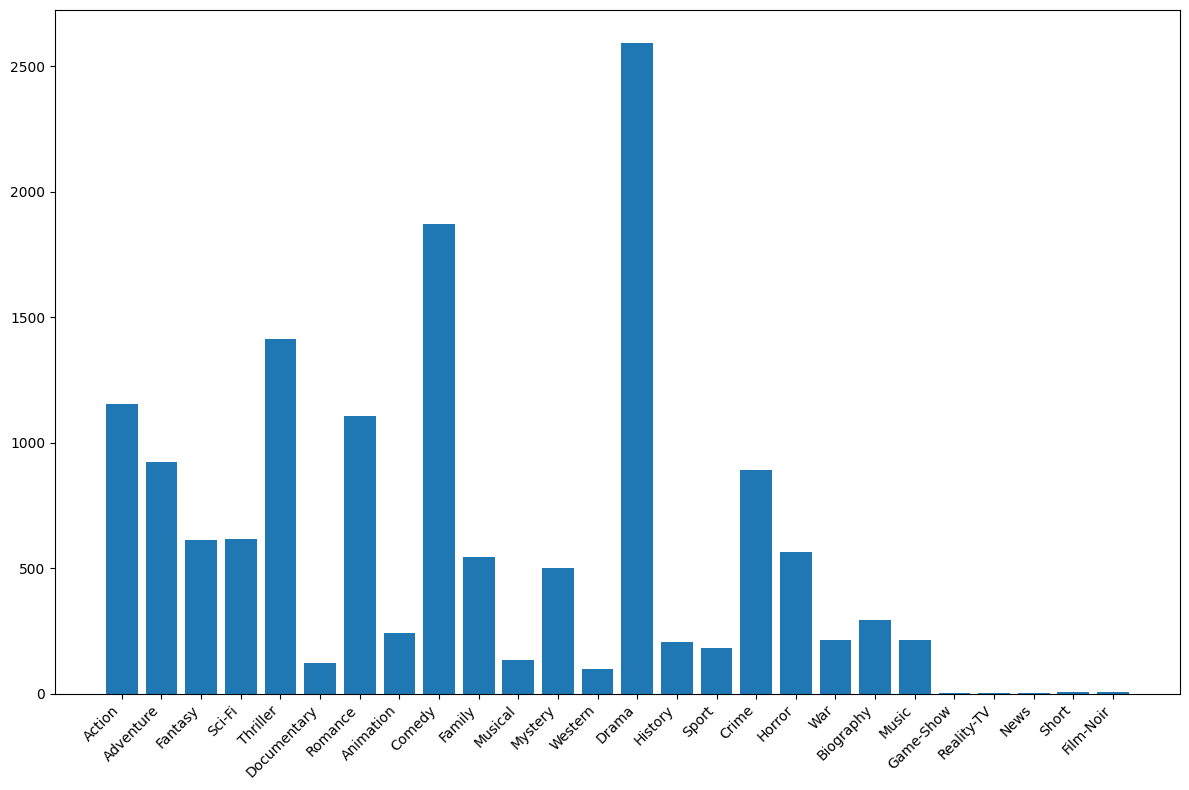
{'Action': 1153, 'Adventure': 923, 'Fantasy': 610, 'Sci-Fi': 616, 'Thriller': 1411, 'Documentary': 121, 'Romance': 1107, 'Animation': 242, 'Comedy': 1872, 'Family': 546, 'Musical': 132, 'Mystery': 500, 'Western': 97, 'Drama': 2594, 'History': 207, 'Sport': 182, 'Crime': 889, 'Horror': 565, 'War': 213, 'Biography': 293, 'Music': 214, 'Game-Show': 1, 'Reality-TV': 2, 'News': 3, 'Short': 5, 'Film-Noir': 6}
plt.figure(figsize=(12, 8))
plt.bar(list(result.keys()), list(result.values()))
plt.xticks(rotation=45, ha='right')
plt.tight_layout()
plt.show()
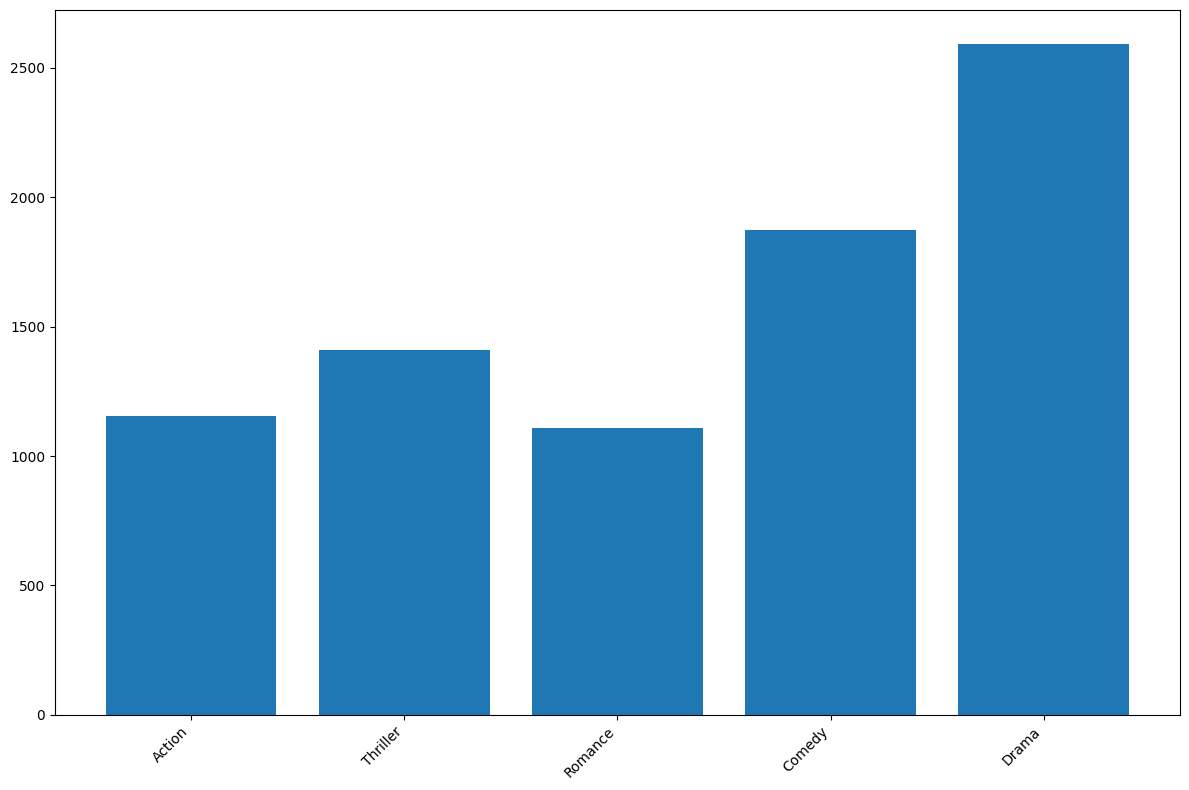
result = await agent.call(
dict[str, int],
"Update the result to only contain the genres that have more than 1000 movies.",
)
To update the result to contain only the genres with more than 1000 movies, we'll filter the dictionary accordingly. Let's do that now.No code was executed. Use ```python code blocks to execute code.
```python
# Filter the genre_count dictionary to include only genres with more than 1000 movies
result = {genre: count for genre, count in genre_count.items() if count > 1000}
plt.figure(figsize=(12, 8))
plt.bar(list(result.keys()), list(result.values()))
plt.xticks(rotation=45, ha='right')
plt.tight_layout()
plt.show()
spawn, see the references.Deep Research (Anthropic-style): Orchestrate Multi-Agent Systems in Agentica
Deep Research (Anthropic-style): Orchestrate Multi-Agent Systems in Agentica
- If on macOS, install system dependencies with
brew install pkg-config cairo meson ninja - Run
pip install exa-py validators markdown xhtml2pdforuv add exa-py validators markdown xhtml2pdf - Create an EXA account, create an
EXA_SERVICE_API_KEYand runexport EXA_SERVICE_API_KEY="<your-key-here>"
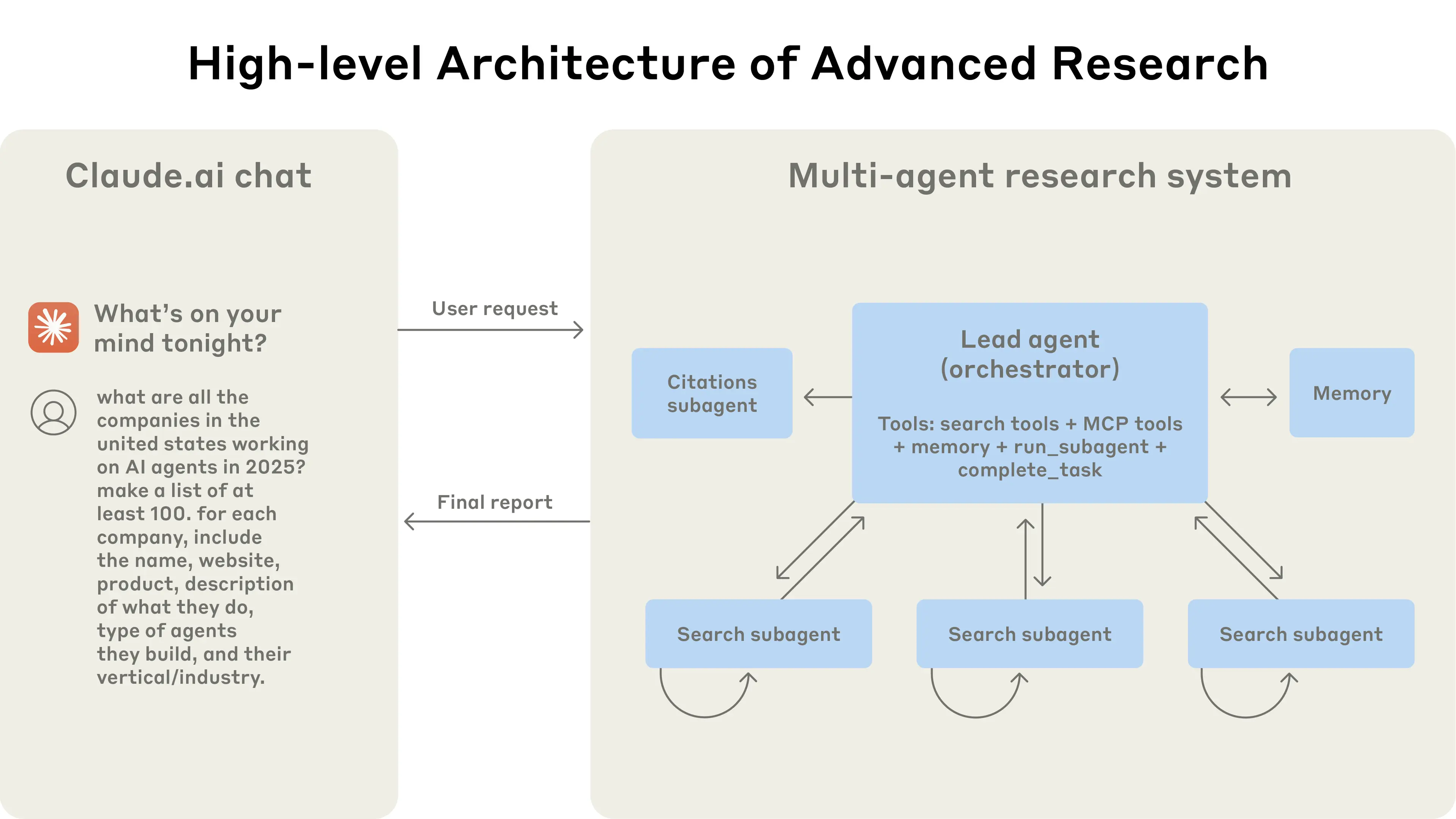
High-level Architecture
High-level Architecture
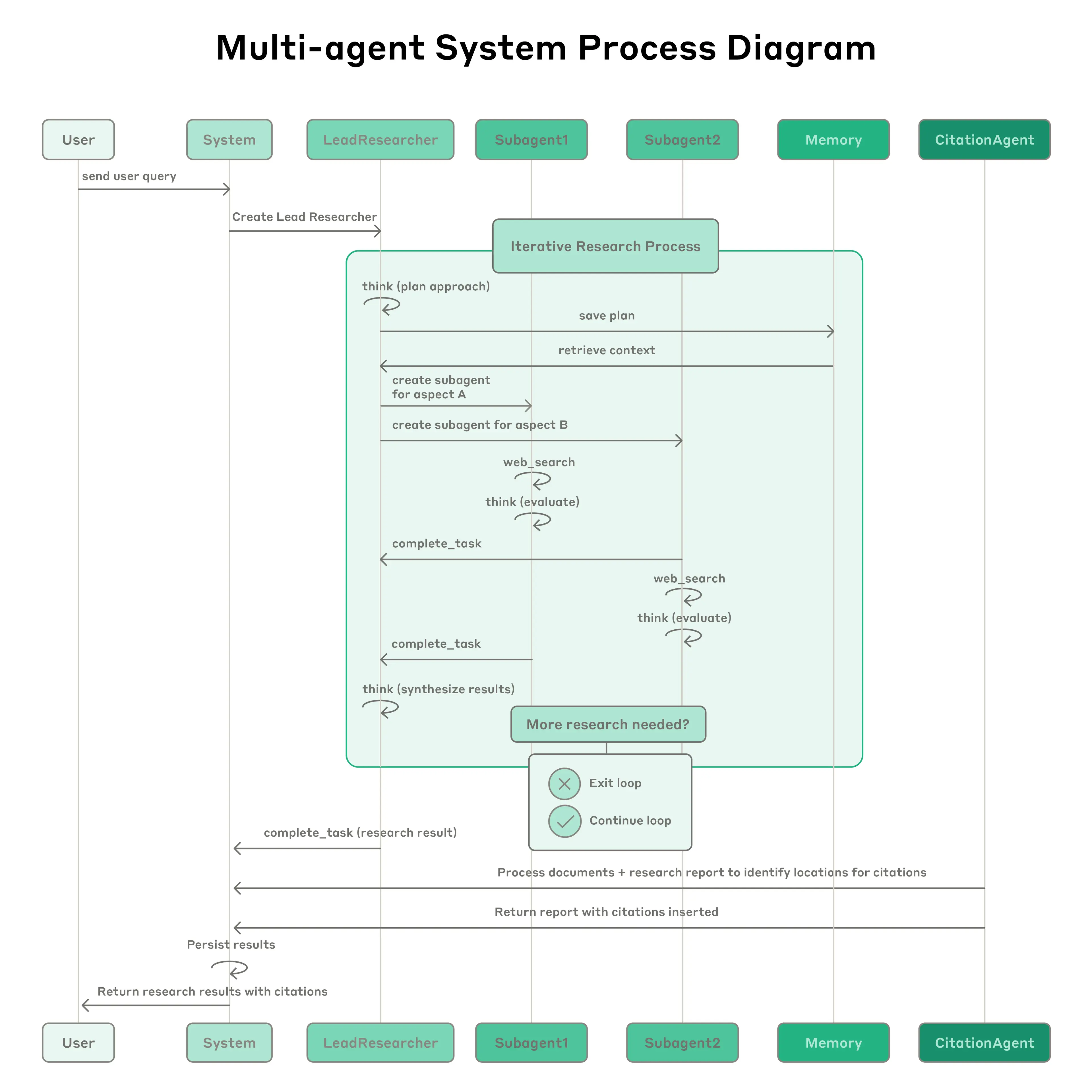
Iterative Process
Iterative Process
markdown, xhtml2pdf as external dependencies.
Additionally, agentica.std.web exports web-search utilities based on Exa.- If you use
web_search/web_fetchdirectly, you needEXA_API_KEY. - This demo creates ephemeral Exa keys per subagent, which requires
EXA_SERVICE_API_KEY.
import asyncio
import json
import re
from dataclasses import dataclass, field
from datetime import datetime
from pathlib import Path
from typing import Literal
import markdown
from xhtml2pdf import pisa
from agentica.agent import Agent
from agentica.logging import AgentListener
from agentica.std.caption import CaptionLogger
from agentica.std.web import ExaAdmin, ExaClient, SearchResult
type SourceType = Literal[
"primary",
"secondary",
"vendor",
"press",
"blog",
"forum",
"unknown",
]
LEAD_RESEARCHER_MODEL = "anthropic:claude-opus-4.5"
SUBAGENT_MODEL = "anthropic:claude-sonnet-4.5"
CITATION_MODEL = "openai:gpt-4.1"
STORAGE_DIR = Path("deep_research_test")
@dataclass
class Storage:
"""Centralized storage for all research artifacts."""
directory: Path = field(default=STORAGE_DIR)
_result_counts: dict[int, int] = field(default_factory=dict)
def __post_init__(self):
self.directory.mkdir(parents=True, exist_ok=True)
# Plan
def save_plan(self, plan: str) -> None:
"""Save the research plan."""
(self.directory / "plan.md").write_text(plan)
def load_plan(self) -> str:
"""Load the research plan."""
path = self.directory / "plan.md"
if not path.exists():
raise FileNotFoundError("Plan file not created yet.")
return path.read_text()
# Search Results
def save_search_result(
self,
subagent_id: int,
result: SearchResult,
lines_used: list[tuple[int, int]],
*,
query: str | None = None,
extracted_claims: list[str] | None = None,
source_type: SourceType | None = None,
source_notes: str | None = None,
) -> str:
count = self._result_counts.get(subagent_id, 0) + 1
self._result_counts[subagent_id] = count
path = self.directory / f"subagent_{subagent_id}" / f"result_{count}.json"
path.parent.mkdir(parents=True, exist_ok=True)
# Extract only the relevant lines
filtered_lines: list[str] = []
for start, end in lines_used:
filtered_lines.extend(result.content_lines[start - 1 : end])
data = {
"title": result.title,
"url": result.url,
"content_lines": filtered_lines,
"score": result.score,
# Rich artifact metadata (kept compatible with SearchResult.load()).
"saved_at": datetime.now().isoformat(),
"subagent_id": subagent_id,
"query": query,
"lines_used": lines_used,
"extracted_claims": extracted_claims or [],
"source_type": source_type,
"source_notes": source_notes,
}
path.write_text(json.dumps(data))
return str(path)
def load_search_result(self, path: str) -> SearchResult:
"""
Load a previously saved search-result artifact (JSON) and return it as a SearchResult.
Note: artifacts may include extra metadata fields, but SearchResult.load() only uses:
- title
- url
- content_lines
- score
"""
p = Path(path)
if not p.is_relative_to(self.directory):
raise ValueError(f"Path must be within {self.directory}")
return SearchResult.load(p)
def list_search_results(self) -> list[str]:
"""List all saved search result paths."""
files: list[str] = []
for subagent_dir in self.directory.glob("subagent_*"):
if not subagent_dir.is_dir():
continue
for file in subagent_dir.iterdir():
if file.suffix == ".json" and re.match(r"^result_\d+$", file.stem):
files.append(str(file))
return files
# Report
def save_report(self, md_report: str) -> str:
"""Save the final report as markdown and PDF."""
md_path = self.directory / "report.md"
pdf_path = self.directory / "report.pdf"
md_path.write_text(md_report)
try:
html = markdown.markdown(md_report, extensions=['tables'])
with pdf_path.open("wb") as pdf:
pisa.CreatePDF(html, dest=pdf)
except Exception as e:
print(f"Warning: PDF conversion failed: {e}")
return str(pdf_path)
@property
def report_path(self) -> Path:
return self.directory / "report.pdf"
def report_exists(self) -> bool:
return (self.directory / "report.md").exists()
# Summary
def summary(self) -> str:
"""Return a summary of all stored artifacts."""
lines = [
"",
"━" * 40,
f"📁 Research stored in: {self.directory.resolve()}",
"━" * 40,
]
if self.report_exists():
lines.append(f"📄 Report: {self.report_path.name}")
if (self.directory / "report.md").exists():
lines.append(f" {(self.directory / 'report.md').name}")
if (self.directory / "plan.md").exists():
lines.append("📋 Plan: plan.md")
search_results = self.list_search_results()
if search_results:
lines.append(f"🔍 Search results: {len(search_results)} files")
by_subagent: dict[str, list[str]] = {}
for path in search_results:
p = Path(path)
subagent = p.parent.name
by_subagent.setdefault(subagent, []).append(p.name)
for subagent, files in sorted(by_subagent.items()):
lines.append(f" {subagent}/: {len(files)} results")
lines.append("━" * 40)
return "\n".join(lines)
storage = Storage()
- the lead researcher should have the option to reuse a subagent with persistent context e.g. asking a subagent to redo a task that it got wrong
- subagents should save the web search results that they use specifying what they have used for the citation agent to review
class SubAgent:
"""
A subagent with web search capabilities.
For each task, a subagent must be **created**, then **run** with `.call()`.
If a subagent needs to be reused, perhaps because it got something wrong, it
may be run **again** with a second `.call()`, persisting its history.
"""
_id: int
_exa: ExaClient | None
_agent: Agent
_initialized: bool
def __init__(self):
self._id = 0
self._exa = None
async def web_search(query: str) -> list[SearchResult]:
"""Tool: search the web for `query`. Returns a small list of SearchResult objects."""
print(f"Searching: {query}")
await self._ensure_init()
assert self._exa is not None
return await self._exa.search(query, num_results=2)
def save_search_result(
result: SearchResult,
lines_used: list[tuple[int, int]],
query: str | None = None,
extracted_claims: list[str] | None = None,
source_type: SourceType | None = None,
source_notes: str | None = None,
) -> str:
"""
Tool: save a SearchResult artifact for later citation/inspection.
Parameters
----------
result:
The SearchResult you are using.
lines_used:
1-indexed (inclusive) line ranges from result.content_lines that support your claims.
query:
The web query you used to find this result (optional but recommended).
extracted_claims:
Short bullet claims you will rely on, derived from the saved lines.
source_type:
Optional coarse label, e.g. "primary", "secondary", "vendor", "press", "blog", "forum", "unknown".
source_notes:
Optional brief notes justifying the label / quality.
Returns
-------
str:
Path to the saved JSON artifact (within the storage directory).
"""
return storage.save_search_result(
self._id,
result,
lines_used,
query=query,
extracted_claims=extracted_claims,
source_type=source_type,
source_notes=source_notes,
)
self._agent = Agent(
model=SUBAGENT_MODEL,
premise=SUBAGENT_PREMISE,
scope=dict(
web_search=web_search,
save_search_result=save_search_result,
SearchResult=SearchResult,
SubAgentReport=SubAgentReport,
SourceInfo=SourceInfo,
),
)
self._initialized = False
async def _ensure_init(self) -> None:
if self._initialized:
return
self._initialized = True
# Get agent ID from listener
await self._agent._ensure_init()
if (listener := self._agent._listener) and listener.logger.local_id:
self._id = int(listener.logger.local_id)
else:
raise ValueError("Agent listener not found")
# Create ephemeral Exa API key for this subagent
admin = ExaAdmin()
key_name = f"SubAgent_{self._id}"
api_key = await admin.create_key(key_name)
print(f"Created Exa API key for subagent {self._id}: {api_key[:4]}...{api_key[-4:]}")
self._exa = ExaClient(api_key=api_key)
async def call(self, task: str) -> 'SubAgentReport':
"""Run the subagent on a task."""
await self._ensure_init()
print(f"Running web-search subagent ({self._id})")
with CaptionLogger():
return await self._agent.call(SubAgentReport, task)
@dataclass
class SourceInfo:
"""
A single source you used in your research.
Fill this out in your SubAgentReport so the coordinator can understand:
- what URL you relied on,
- what you searched for to find it,
- what claims you are taking from it,
- and an approximate source category (primary/secondary/vendor/press/blog/forum/unknown).
"""
url: str
source_type: SourceType | None = None
query: str | None = None
extracted_claims: list[str] = field(default_factory=list)
artifact_path: str | None = None
lines_used: list[tuple[int, int]] = field(default_factory=list)
@dataclass
class SubAgentReport:
"""
Your final output for one subagent task.
Requirements:
- `content` may be paraphrased, but MUST be supported by the saved `lines_used`.
- `sources` must include one SourceInfo per source you relied on.
"""
title: str
content: str
sources: list[SourceInfo] = field(default_factory=list)
class CitationAgent:
"""Agent that adds citations to a research report."""
def __init__(self):
self._agent = Agent(
model=CITATION_MODEL,
premise=CITATION_PREMISE,
scope=dict(
list_search_results=storage.list_search_results,
load_search_result=storage.load_search_result,
save_report=storage.save_report,
),
)
async def call(self, md_report: str) -> None:
"""Add citations to a research report."""
print("Running citation agent")
return await self._agent.call(
None,
f"The `research_report = '{md_report[:10]}...' [truncated]` has been provided to you in the REPL.",
research_report=md_report,
)
- the citation agent is always called after the research report is generated by the lead researcher, and
- the user has the opportunity to ask follow-up questions after receiving the research report.
class DeepResearchSession:
"""Orchestrates a deep research session with multiple agents."""
def __init__(self):
self._lead_researcher = Agent(
model=LEAD_RESEARCHER_MODEL,
premise=LEAD_RESEARCHER_PREMISE,
scope=dict(
save_plan=storage.save_plan,
load_plan=storage.load_plan,
list_search_results=storage.list_search_results,
load_search_result=storage.load_search_result,
SubAgent=SubAgent,
SubAgentReport=SubAgentReport,
SourceInfo=SourceInfo,
SearchResult=SearchResult,
),
listener=lambda: AgentListener(CaptionLogger("Lead Researcher")),
)
self._citation_agent = CitationAgent()
async def call(self, query: str) -> str:
"""Run the deep research process."""
try:
# Research phase
report = await self._lead_researcher.call(str, query)
# Citation phase
with CaptionLogger():
await self._citation_agent.call(report)
if not storage.report_exists():
raise RuntimeError("Report was not created")
print(storage.summary())
return f"Check out the research report at {storage.report_path}. Ask me any questions!"
finally:
# Clean up ephemeral API keys
print("Pruning Exa API keys...")
deleted = await ExaAdmin().prune_keys(prefix="SubAgent_")
if deleted:
print(f"Pruned {deleted} key(s)")
CITATION_PREMISE = """
You are a citation agent.
# Task
You must:
1. Review the research report provided to you as `research_report` line by line.
2. Identify which lines of the research report use information that could be from web search results.
3. List the web search results that were used in creating the research report.
4. For each of these lines, use the `load_search_result` function to load the web search result that was used.
5. Add a markdown citation with the URL of the web search result to the claim in the research report by modifying the `research_report` variable.
6. Once this is done, make sure the `research_report` is valid markdown - if not, change the markdown to make it valid.
7. Use the `save_report` function to save the research report to memory as a markdown file at the end.
8. Return saying you have finished.
# Rules
- Your citations MUST be consistent throughout the `research_report`.
- Any URL in the final markdown MUST be formatted as a markdown link, not a bare URL.
- You MUST use the `list_search_results` function to list the web search results that were used in creating the research report
- You MUST use the `load_search_result` function to load the web search results.
- You MUST use the `research_report` variable provided to you to modify the research report by adding citations.
- You MUST make sure the `research_report` is valid markdown.
- You MUST use the `save_report` function to save the research report to memory at the end.
- You MUST inspect the report before saving it to make sure it is valid and what you intended. Iterate until it is valid.
## Citation format
- Prefer inline citations like: `... claim ... ([source](https://example.com))`
- If multiple sources support a sentence, include multiple links: `... ([s1](...), [s2](...))`
"""
LEAD_RESEARCHER_PREMISE = """
You are a lead researcher. You have access to web-search enabled subagents.
# Task
You must:
1. Create a plan to research the user query.
2. Determine how many specialised subagents (with access to the web) are necessary, each with a different specific research task.
3. Call ALL subagents in parallel using asyncio.gather with return_exceptions=True so partial results are preserved.
4. Summarise the results of the subagents in a final research report as markdown. Use sections, sub-sections, list and formatting to make the report easy to read and understand. The formatting should be consistent and easy to follow.
5. Check the final research report, as this will be shown to the user.
6. Return the final research report using `return` at the very end.
# Rules
- Do NOT construct the final report until you have run the subagents.
- Do NOT return the final report in the REPL until planning, assigning subagents and returning the final report is complete.
- Do NOT add citations to the final research report yourself, this will be done afterwards.
- Do NOT repeat yourself in the final research report.
- You MUST raise an AgentError if you cannot complete the task with what you have available.
- You MUST check the final research report string before returning it to the user.
## Planning
- You MUST write the plan yourself.
- You MUST write the plan before assigning subagents to tasks.
- You MUST break down the task into small individual tasks.
## Subagents
- You MUST assign each small individual task to a subagent.
- For each task, YOU MUST create a **new** SubAgent, and provide it with a task via `.call()`.
- You MUST NOT assign multiple unrelated tasks to the same SubAgent.
- You should only call a SubAgent repeatedly if you feel you failed to get enough information from a single call, instructing them with what they were missing.
- You MUST instruct subagents to use the web_search and save_search_result functions if the task requires it.
- Do NOT ask subagents to cite the web, instead instruct them to use the save_search_result function.
- Subagents MUST be assigned independent tasks.
- IF after subagents have returned their findings more research is needed, you can assign more subagents to tasks.
- DO NOT try to preemptively *parse* the output of the subagents, **just look at the output yourself**.
- Subagents may fail! `asyncio.gather` will raise an exception if any of the subagents fail. Instead, you should pass `return_exceptions=True` to `asyncio.gather` to not lose the results of the successful subagents.
## Final Report
- Do NOT write the final report yourself without running subagents to do so.
- Do NOT add citations to the final research report yourself, this will be done afterwards by another agent.
- Do NOT repeat yourself in the final research report.
- Do NOT return a report with missing information, omitted fields or `N/A` values. If more work needs to be done, you must assign more subagents to tasks, or reuse the necessary subagents to extract more information.
- You MUST load the plan from memory before returning the final research report to check that you have followed the plan.
- You MUST check the final research report before returning it to the user.
- Check the final report for quality, completeness and consistency. If up to standard, return using a single `return` as the sole statement in its very own
- Your final report MUST include a short "Sources consulted" section:
- List each source URL you relied on
- Include its source_type and 1-2 extracted claims
- Any URL you include MUST be a markdown hyperlink (not a bare URL).
- Do NOT put the whole report in a table.
"""
SUBAGENT_PREMISE = """
You are a helpful assistant.
# Task
You must:
1. Construct a list of things to search for using the web_search function.
2. Execute ALL web_search calls in parallel using asyncio.gather and asyncio.run.
3. For each search result, `print()` relevant sections using SearchResult.content_with_line_numbers(start=..., end=...).
4. Identify which lines of content you are going to use in your report.
5. Use the save_search_result function to save the SearchResult to memory and include the lines of the content that you have used.
- Include the specific `query` you searched for.
- Include `extracted_claims`: a list of short claims you will rely on (derived from the saved lines).
- Include `source_type`: one of ["primary", "secondary", "vendor", "press", "blog", "forum", "unknown"].
Use your best judgment based on the URL/domain and the content.
- IMPORTANT: save_search_result returns a saved artifact path; keep it and include it in SourceInfo.artifact_path
6. Condense the search results into a single report with what you have found.
7. Return the report using `return` at the very end in a separate REPL session.
# Rules
- You MUST use `print()` to print the content of each search result by via SearchResult.content_with_line_numbers().
- You MUST use the web_search function if instructed to do so OR if the task requires finding information.
- Do NOT assume that the web_search function will return the information you need, you must go through the content of each search result line by line by combing through the content with SearchResult.content_with_line_numbers(start=, end=).
- Do NOT assume which lines of content you are going to use in your report, you must go through the content of each search result line by line via SearchResult.content_with_line_numbers(start=, end=).
- If you cannot find any information, do NOT provide information yourself, instead raise an error for the lead researcher in the REPL.
- You MUST save the SearchResult of any research that you have used to memory and include the lines of the content that you have used (are relevant).
- When saving, pass `query`, `extracted_claims`, and `source_type` to save_search_result.
- Your returned SubAgentReport MUST include `sources`: one entry per saved source, including url, source_type, query, extracted_claims, artifact_path, and lines_used.
- Return the report using `return` at the very end in a separate REPL session.
"""
if __name__ == "__main__":
session = DeepResearchSession()
result = asyncio.run(
session.call(
"What are all of the companies in the US working on AI agents in 2025? "
"Make a list of at least 10. For each, include the name, website and product, "
"description of what they do, type of agents they build, and their vertical/industry."
)
)
print(result)
Slack Bot: Let Agentica use an SDK
Slack Bot: Let Agentica use an SDK
- Install Agentica and run
npx agentica-setup, choosing Plain TS. - Run
npm add @slack/web-api(or usepnpm,bun) - Add your
SLACK_BOT_TOKEN
SLACK_BOT_TOKEN !import { agentic } from '@symbolica/agentica';
import { WebClient } from '@slack/web-api';
const SLACK_BOT_TOKEN = 'YOUR-TOKEN-HERE';
// Initialize Slack client
const slackClient = new WebClient(SLACK_BOT_TOKEN);
/** Post message
* @param userName The name of the user to send a morning message to
*/
async function postMessage(userName: string, text: string): Promise<void> {
await slackClient.chat.postMessage({
channel: `@${userName}`,
text: text,
});
}
/**
* Uses the Slack API to send the user a direct message. Light and cheerful!
* @param userName The name of the user to send a morning message to
*/
async function sendMorningMessage(userName: string): Promise<void> {
await agentic<void>('Use the Slack API to send the user a direct message. Light and cheerful!', {
postMessage,
userName,
});
}
// Execute the function
void sendMorningMessage('John Smith');
Multi-language translation: Create multi-agent streaming UI components
Multi-language translation: Create multi-agent streaming UI components
- Install Agentica and run
npx agentica-setup, choosing Plain TS. - Run
npm add ink ink-text-input react @types/react tsx(or usepnpm,bun)
@symbolica/agentica agents for translation and React Ink for a live TUI.We’ll create:- a backend that spawns per-language translator agents and streams partial output
- a terminal UI that shows live progress for each language and lets you queue a next phrase
Backend: Translator agents and coordinator
Backend: Translator agents and coordinator
import { Agent, spawn } from '@symbolica/agentica';
Translator that encapsulates a single agent and exposes a streaming callback./**
* Represents a single language translator agent
*/
export class Translator {
id: string;
language: string;
private agent: Agent | null = null;
onProgress?: (chunk: string) => void;
constructor(id: string, language: string) {
this.id = id;
this.language = language;
}
async initialize(): Promise<void> {
this.agent = await spawn({
system: `You are an expert ${this.language} translator.
Your task is to provide a single best translation of the user's text into ${this.language}.
STRICT RULES:
- Return ONLY the best-effort translated text.
- Do NOT add explanations, notes, or any extra words.
- Do NOT mention dialects or alternatives.
- Do NOT ask clarifying questions.
- Do NOT use any English, or any other language other than the requested target language in your response.
- Be natural and idiomatic, but concise.
- Preserve meaning precisely as best you can without adding ANY context.`,
model: 'openai:gpt-4.1',
});
}
async translate(text: string): Promise<string> {
if (!this.agent) {
throw new Error(`Translator ${this.id} not initialized`);
}
// Use local variable so transformer can handle it
const agent = this.agent;
let result: string = await agent.call<string>(
`Translate the text into "${this.language}". Respond with ONLY the best-effort translated text with NO additional context.\n\n${text}`,
{
text,
language: this.language,
},
{
listener: (iid: string, chunk: { content?: string; role?: string }) => {
// Only forward agent-generated content, not system/user messages
if (this.onProgress && chunk && chunk.content && chunk.role === 'agent') {
this.onProgress(chunk.content);
}
},
}
);
// Post-process to enforce strict output
result = (result ?? '').trim();
// Strip code fences and labels like "Translation:" or language prefixes
result = result
.replace(/^```[a-z]*\n([\s\S]*?)\n```$/i, '$1')
.replace(/^\s*(translation\s*:\s*)/i, '')
.replace(new RegExp(`^\s*(${this.language})\s*:\s*`, 'i'), '')
.trim();
// Remove surrounding quotes if model added them
if ((result.startsWith('"') && result.endsWith('"')) || (result.startsWith("'") && result.endsWith("'"))) {
result = result.slice(1, -1).trim();
}
return result;
}
async close(): Promise<void> {
if (this.agent) {
await this.agent.close();
}
}
}
TranslationManager and UI callbacks./**
* Coordinates multiple translator agents working in parallel
*/
export class TranslationManager {
private translators: Map<string, Translator> = new Map();
// Callbacks for UI updates
onTranslatorSpawned?: (id: string, language: string) => void;
onTranslatorProgress?: (id: string, chunk: string) => void;
onTranslatorComplete?: (id: string, translation: string) => void;
translateToMany method on this class.
It consists of two phases:Phase 1: Initialize all translators concurrently and register streaming. async translateToMany(text: string, languages: string[]): Promise<Map<string, string>> {
// Phase 1: Create and initialize all translators in parallel
const initPromises = languages.map(async (language, index) => {
const id = `translator_${index}`;
const translator = new Translator(id, language);
// Set up progress callback
translator.onProgress = (chunk: string) => {
this.onTranslatorProgress?.(id, chunk);
};
// Initialize the translator
await translator.initialize();
this.translators.set(id, translator);
// Notify UI that translator was spawned
this.onTranslatorSpawned?.(id, language);
return { id, language, translator };
});
const translators = await Promise.all(initPromises);
// Phase 2: Run all translations in parallel (don't await here!)
const translationPromises = translators.map(({ id, language, translator }) => {
return (async () => {
const finalTranslation = await translator.translate(text);
// Notify completion
this.onTranslatorComplete?.(id, finalTranslation);
return { language, translation: finalTranslation };
})();
});
// Wait for all translations to complete
const results = await Promise.all(translationPromises);
// Convert to map for easy lookup
const translations = new Map<string, string>();
for (const { language, translation } of results) {
translations.set(language, translation);
}
return translations;
}
close method to close and clear all translators when leaving the session. async close(): Promise<void> {
// Close all translators
for (const translator of this.translators.values()) {
await translator.close();
}
this.translators.clear();
}
// [end of TranslationManager]
}
Terminal UI: Live streaming with Ink
Terminal UI: Live streaming with Ink
import { Box, Text, render, useApp, useInput } from 'ink';
import TextInput from 'ink-text-input';
import React, { useEffect, useMemo, useState } from 'react';
import { TranslationManager } from './backend.js';
const languageEmojis: Record<string, string> = {
Spanish: '🇪🇸',
French: '🇫🇷',
German: '🇩🇪',
Japanese: '🇯🇵',
Italian: '🇮🇹',
Portuguese: '🇵🇹',
Korean: '🇰🇷',
Chinese: '🇨🇳',
};
const AVAILABLE_LANGUAGES = [
'Spanish', 'French', 'German', 'Japanese',
'Italian', 'Portuguese', 'Korean', 'Chinese'
] as const;
type Language = typeof AVAILABLE_LANGUAGES[number];
interface TranslatorState {
language: string; // allow custom languages
chunks: string[];
complete: boolean;
}
interface TranslationViewProps {
text: string;
languages: string[]; // may include custom user-provided languages
onNextPhrase?: (text: string) => void;
}
TranslationView that wires manager callbacks to live UI updates.const TranslationView: React.FC<TranslationViewProps> = ({ text, languages, onNextPhrase }) => {
const [translatorStates, setTranslatorStates] = useState<Map<string, TranslatorState>>(new Map());
const [isComplete, setIsComplete] = useState(false);
const [manager] = useState(() => new TranslationManager());
const [nextPhrase, setNextPhrase] = useState('');
const { exit } = useApp();
useEffect(() => {
manager.onTranslatorSpawned = (id: string, language: string) => {
setTranslatorStates((prev: Map<string, TranslatorState>) => {
const newMap = new Map<string, TranslatorState>(prev);
newMap.set(id, { language, chunks: [], complete: false });
return newMap;
});
};
manager.onTranslatorProgress = (id: string, chunk: string) => {
setTranslatorStates((prev: Map<string, TranslatorState>) => {
const newMap = new Map<string, TranslatorState>(prev);
const state = newMap.get(id);
if (state) {
state.chunks.push(chunk);
newMap.set(id, { ...state });
}
return newMap;
});
};
manager.onTranslatorComplete = (id: string) => {
setTranslatorStates((prev: Map<string, TranslatorState>) => {
const newMap = new Map<string, TranslatorState>(prev);
const state = newMap.get(id);
if (state) {
state.complete = true;
newMap.set(id, { ...state });
}
return newMap;
});
};
// Reset state and start the translation
const runTranslation = async () => {
setTranslatorStates(new Map());
setIsComplete(false);
const results = await manager.translateToMany(text, languages);
setIsComplete(true);
};
runTranslation().catch(console.error);
// Cleanup
return () => {
manager.close().catch(console.error);
};
}, [text, languages, manager]);
const completedCount = Array.from<TranslatorState>(translatorStates.values()).filter((s: TranslatorState) => s.complete).length;
const totalCount = translatorStates.size;
// Allow Esc to exit while on the translation screen as well
useInput((input, key) => {
if (key.escape) {
// Try to close agents, then force exit regardless
manager.close().catch(() => {}).finally(() => {
exit();
setTimeout(() => (globalThis as any).process?.exit(0), 10);
});
}
});
return (
<Box flexDirection="column" padding={2}>
{/* Header */}
<Box borderStyle="double" borderColor="magenta" paddingX={3} paddingY={1} marginBottom={2}>
<Text bold color="magenta">
🌍 ✨ Multi-Language Translation Dashboard ✨ 🌍
</Text>
</Box>
{/* Input Section */}
<Box
borderStyle="round"
borderColor="cyan"
paddingX={2}
paddingY={1}
marginBottom={2}
flexDirection="column"
>
<Text bold color="cyan" dimColor>
📝 SOURCE TEXT
</Text>
<Box marginTop={1} marginBottom={1}>
<Text color="white" italic>
"{text}"
</Text>
</Box>
<Text>
<Text bold color="cyan" dimColor>🎯 TARGET LANGUAGES: </Text>
<Text color="yellow" bold>{languages.join(' • ')}</Text>
</Text>
</Box>
{/* Progress Bar */}
{totalCount > 0 && (
<Box marginBottom={2}>
<Text>
<Text bold color="blue">⚡ Progress: </Text>
<Text color={isComplete ? "green" : "yellow"} bold>
{completedCount}/{totalCount} completed
</Text>
{isComplete && <Text color="green"> 🎉</Text>}
</Text>
</Box>
)}
{/* Translations Section */}
<Box
borderStyle="round"
borderColor="yellow"
paddingX={2}
paddingY={1}
flexDirection="column"
>
<Box marginBottom={1}>
<Text bold color="yellow">
🔄 LIVE TRANSLATIONS
</Text>
</Box>
<Box flexDirection="column" marginTop={1}>
{Array.from<[string, TranslatorState]>(translatorStates.entries()).map(([id, state]: [string, TranslatorState]) => {
const emoji = languageEmojis[state.language] || '🌐';
const translationText = state.chunks.join('');
return (
<Box
key={id}
flexDirection="column"
marginBottom={1}
paddingLeft={1}
borderStyle="single"
borderColor={state.complete ? "green" : "gray"}
>
<Box marginBottom={0}>
<Text color={state.complete ? "green" : "cyan"} bold>
{emoji} {state.language}
</Text>
{state.complete && <Text color="green" bold> ✓</Text>}
{!state.complete && <Text color="yellow" bold> ⟳</Text>}
</Box>
<Box paddingLeft={1} paddingY={0}>
<Text color={state.complete ? "white" : "gray"}>
{translationText || '...'}
</Text>
{!state.complete && <Text color="cyan" bold> ▊</Text>}
</Box>
</Box>
);
})}
</Box>
</Box>
{/* Next input box under translations */}
<Box
marginTop={2}
borderStyle="round"
borderColor="cyan"
paddingX={2}
paddingY={1}
flexDirection="column"
>
<Box marginBottom={1}>
<Text bold color="cyan">📝 Enter next text to translate:</Text>
</Box>
<Box>
<Text color="yellow">› </Text>
<TextInput
value={nextPhrase}
onChange={setNextPhrase}
onSubmit={() => {
const trimmed = nextPhrase.trim();
if (trimmed) {
onNextPhrase?.(trimmed);
setNextPhrase('');
}
}}
placeholder={isComplete ? 'Type your next text here...' : 'Wait until current translation completes...'}
/>
</Box>
<Box marginTop={1}>
<Text dimColor>
Press <Text color="green">Enter</Text> to start translation; <Text color="red">Esc</Text> to exit.
</Text>
</Box>
{!isComplete && (
<Box marginTop={1}>
<Text dimColor>Current translation in progress...</Text>
</Box>
)}
</Box>
</Box>
);
};
type Step = 'select' | 'input' | 'translate';
const App: React.FC = () => {
const [inputText, setInputText] = useState('');
const [selectedLanguages, setSelectedLanguages] = useState<Set<Language>>(new Set());
const [currentStep, setCurrentStep] = useState<Step>('select');
const [cursorIndex, setCursorIndex] = useState(0);
const [additionalLanguagesText, setAdditionalLanguagesText] = useState('');
const [selectFocusIndex, setSelectFocusIndex] = useState<0 | 1>(0); // select step: 0 = list, 1 = additional input
const { exit } = useApp();
useInput((input, key) => {
if (currentStep === 'select') {
if (input === '\t') {
setSelectFocusIndex(prev => (prev === 0 ? 1 : 0));
return;
}
if (selectFocusIndex === 0 && key.upArrow) {
setCursorIndex(prev => Math.max(0, prev - 1));
return;
}
if (selectFocusIndex === 0 && key.downArrow) {
if (cursorIndex === AVAILABLE_LANGUAGES.length - 1) {
setSelectFocusIndex(1);
} else {
setCursorIndex(prev => Math.min(AVAILABLE_LANGUAGES.length - 1, prev + 1));
}
return;
}
if (selectFocusIndex === 1 && key.upArrow) {
setSelectFocusIndex(0);
return;
}
if (selectFocusIndex === 0 && input === ' ') {
const lang = AVAILABLE_LANGUAGES[cursorIndex];
if (lang === undefined) return;
setSelectedLanguages(prev => {
const newSet = new Set(prev);
if (newSet.has(lang)) {
newSet.delete(lang);
} else {
newSet.add(lang);
}
return newSet;
});
return;
}
if (key.return && selectedLanguages.size > 0) {
setCurrentStep('input');
return;
}
} else if (currentStep === 'input') {
if (key.escape) {
exit();
setTimeout(() => (globalThis as any).process?.exit(0), 10);
return;
}
}
});
const extraLanguages = useMemo(() => (
additionalLanguagesText
.split(',')
.map(s => s.trim())
.filter(Boolean)
), [additionalLanguagesText]);
const combinedLanguages: string[] = useMemo(() => ([
...Array.from(selectedLanguages),
...extraLanguages,
]), [selectedLanguages, extraLanguages]);
if (currentStep === 'translate') {
return (
<TranslationView
text={inputText}
languages={combinedLanguages}
onNextPhrase={(text: string) => {
setInputText(text);
}}
/>
);
}
return (
<Box flexDirection="column" padding={2}>
{/* Header */}
<Box borderStyle="double" borderColor="magenta" paddingX={3} paddingY={1} marginBottom={2}>
<Text bold color="magenta">
🌍 ✨ Multi-Language Translation Setup ✨ 🌍
</Text>
</Box>
{currentStep === 'select' && (
<Box flexDirection="column">
<Box
borderStyle="round"
borderColor="yellow"
paddingX={2}
paddingY={1}
marginBottom={1}
flexDirection="column"
>
<Box marginBottom={1}>
<Text bold color="yellow">
🎯 Select target languages:
</Text>
</Box>
<Box flexDirection="column" marginTop={1}>
{AVAILABLE_LANGUAGES.map((lang, index) => {
const isSelected = selectedLanguages.has(lang);
const isCursor = index === cursorIndex;
const emoji = languageEmojis[lang] || '🌐';
return (
<Box key={lang}>
<Text {...(isCursor && selectFocusIndex === 0 ? { color: 'cyan' as const } : {})}>
{isCursor ? '→ ' : ' '}
[{isSelected ? '✓' : ' '}] {emoji} {lang}
</Text>
</Box>
);
})}
</Box>
<Box marginTop={1}>
<Text bold color="yellow">➕ Additional languages (optional)</Text>
</Box>
<Box>
<Text color="yellow">› </Text>
<TextInput
value={additionalLanguagesText}
onChange={setAdditionalLanguagesText}
onSubmit={() => {
if (selectedLanguages.size > 0) {
setCurrentStep('input');
}
}}
placeholder="Klingon, Sami"
focus={selectFocusIndex === 1}
/>
</Box>
</Box>
<Box flexDirection="column" marginTop={1}>
<Text dimColor><Text color="cyan">↑↓</Text> Navigate • <Text color="yellow">Space</Text> Select • <Text color="cyan">Tab</Text> Focus input • <Text color="green">Enter</Text> Continue</Text>
<Box marginTop={0}>
<Text color="yellow">
Selected: {selectedLanguages.size} language{selectedLanguages.size !== 1 ? 's' : ''}
</Text>
</Box>
</Box>
</Box>
)}
{currentStep === 'input' && (
<Box flexDirection="column">
<Box
borderStyle="round"
borderColor="cyan"
paddingX={2}
paddingY={1}
marginBottom={1}
flexDirection="column"
>
<Box marginBottom={1}>
<Text bold color="cyan">📝 Enter text to translate:</Text>
</Box>
<Box>
<Text color="yellow">› </Text>
<TextInput
value={inputText}
onChange={setInputText}
onSubmit={() => {
if (inputText.trim()) {
setCurrentStep('translate');
}
}}
placeholder="Type your text here..."
/>
</Box>
</Box>
<Box marginTop={1}>
<Text dimColor>
Press <Text color="green">Enter</Text> to start translation; <Text color="red">Esc</Text> to exit.
</Text>
</Box>
</Box>
)}
</Box>
);
};
<App/> component at the top-level of our script.// Run the app
render(<App />);
# Install dependencies (or use `pnpm`, `bun`)
npm install
npx agentica-setup # Choose Plain TS
npx tspc
# Run the terminal UI
node translation.js
Deep Research (Anthropic-style): Orchestrate Multi-Agent Systems in Agentica
Deep Research (Anthropic-style): Orchestrate Multi-Agent Systems in Agentica
- If on macOS, install system dependencies with
brew install pkg-config cairo meson ninja - Install Agentica and run
npx agentica-setup, choosing Plain TS. - Run
npm add md-to-pdf(or usepnpm,bun) - Create an EXA account, create an
EXA_SERVICE_API_KEYand runexport EXA_SERVICE_API_KEY="<your-key-here>"
High-level Architecture
High-level Architecture
Iterative Process
Iterative Process
md-to-pdf as an external dependency.
Additionally, @symbolica/agentica/std/web exports web-search utilities based on Exa.- If you use
webSearch/webFetchdirectly, you needEXA_API_KEY. - This demo creates ephemeral Exa keys per subagent, which requires
EXA_SERVICE_API_KEY.
import * as fs from 'fs';
import * as path from 'path';
import { randomUUID } from 'crypto';
import { Agent, spawn } from '@symbolica/agentica';
import { ExaAdmin, ExaClient, SearchResult } from '@symbolica/agentica/std/web';
import { mdToPdf } from 'md-to-pdf';
import { exit } from 'process';
const STORAGE_DIR = 'deep_research_test';
/**
* Centralized storage for all research artifacts.
*/
class Storage {
private readonly directory = STORAGE_DIR;
private resultCounts: Map<number, number> = new Map();
constructor() {
fs.mkdirSync(this.directory, { recursive: true });
}
// Plan
/**
* Save the research plan.
*/
savePlan(plan: string): void {
fs.writeFileSync(path.join(this.directory, 'plan.md'), plan);
console.log(`[storage] saved plan.md (${plan.length} chars)`);
}
/**
* Load the research plan.
*/
loadPlan(): string {
const planPath = path.join(this.directory, 'plan.md');
if (!fs.existsSync(planPath)) {
throw new Error('Plan file not created yet.');
}
return fs.readFileSync(planPath, 'utf-8');
}
// Search Results
/**
* Tool storage: persist the *used* slices of a SearchResult as a JSON artifact.
*
* The returned file is later consumed by the citation agent via `loadSearchResult()`.
*
* - `linesUsed` is 1-indexed inclusive ranges into `result.contentLines`.
* - `meta` is optional but helps trace provenance (query, claims, source quality).
*/
saveSearchResult(
subagentId: number,
result: SearchResult,
linesUsed: Array<[number, number]>,
meta?: {
// With `exactOptionalPropertyTypes`, passing `{ query: undefined }` is not
// assignable to `{ query?: string }`. Allow explicit `undefined` so
// subagents can pass optional args positionally without extra boilerplate.
query?: string | undefined;
extractedClaims?: string[] | undefined;
sourceType?: SourceType | undefined;
sourceNotes?: string | undefined;
}
): string {
const count = (this.resultCounts.get(subagentId) ?? 0) + 1;
this.resultCounts.set(subagentId, count);
const subagentDir = path.join(this.directory, `subagent_${subagentId}`);
fs.mkdirSync(subagentDir, { recursive: true });
const filePath = path.join(subagentDir, `result_${count}.json`);
// Extract only the relevant lines
const filteredLines: string[] = [];
for (const [start, end] of linesUsed) {
filteredLines.push(...result.contentLines.slice(start - 1, end));
}
const data = {
title: result.title,
url: result.url,
content_lines: filteredLines,
score: result.score,
// Rich artifact metadata (kept compatible with SearchResult.fromJSON/load in citation flows).
saved_at: new Date().toISOString(),
subagent_id: subagentId,
query: meta?.query ?? null,
lines_used: linesUsed,
extractedClaims: meta?.extractedClaims ?? [],
sourceType: meta?.sourceType ?? null,
sourceNotes: meta?.sourceNotes ?? null,
};
fs.writeFileSync(filePath, JSON.stringify(data));
console.log(`[storage] saved search artifact: ${filePath} (${result.url})`);
return filePath;
}
loadSearchResult(filePath: string): SearchResult {
/**
* Load a previously saved JSON artifact and return it as a SearchResult.
*
* Note: artifacts may include extra metadata fields, but the SearchResult
* payload is reconstructed from the core fields.
*/
const resolvedPath = path.resolve(filePath);
if (!resolvedPath.startsWith(path.resolve(this.directory))) {
throw new Error(`Path must be within ${this.directory}`);
}
const data = JSON.parse(fs.readFileSync(filePath, 'utf-8'));
return new SearchResult({
title: data.title,
url: data.url,
contentLines: data.content_lines,
score: data.score,
});
}
/**
* List all saved search result paths.
*/
listSearchResults(): string[] {
const files: string[] = [];
const entries = fs.readdirSync(this.directory, { withFileTypes: true });
for (const entry of entries) {
if (entry.isDirectory() && entry.name.startsWith('subagent_')) {
const subagentDir = path.join(this.directory, entry.name);
const subFiles = fs.readdirSync(subagentDir);
for (const file of subFiles) {
if (file.endsWith('.json') && /^result_\d+\.json$/.test(file)) {
files.push(path.join(subagentDir, file));
}
}
}
}
return files;
}
// Report
/**
* Save the final report as markdown and PDF.
*/
async saveReport(mdReport: string): Promise<string> {
const mdPath = path.join(this.directory, 'report.md');
const pdfPath = path.join(this.directory, 'report.pdf');
fs.writeFileSync(mdPath, mdReport);
console.log(`[storage] saved report.md (${mdReport.length} chars)`);
try {
const pdf = await mdToPdf({ content: mdReport });
if (pdf.content) {
fs.writeFileSync(pdfPath, pdf.content);
console.log(`[storage] saved report.pdf (${pdf.content.length} bytes)`);
}
} catch (e) {
console.warn(`Warning: PDF conversion failed: ${e}`);
}
return pdfPath;
}
get reportPath(): string {
return path.join(this.directory, 'report.pdf');
}
reportExists(): boolean {
return fs.existsSync(path.join(this.directory, 'report.md'));
}
// Summary
/**
* Return a summary of all stored artifacts.
*/
summary(): string {
const lines = [
'',
'━'.repeat(40),
`📁 Research stored in: ${path.resolve(this.directory)}`,
'━'.repeat(40),
];
if (this.reportExists()) {
lines.push(`📄 Report: report.pdf`);
lines.push(` report.md`);
}
if (fs.existsSync(path.join(this.directory, 'plan.md'))) {
lines.push('📋 Plan: plan.md');
}
const searchResults = this.listSearchResults();
if (searchResults.length > 0) {
lines.push(`🔍 Search results: ${searchResults.length} files`);
const bySubagent: Map<string, string[]> = new Map();
for (const filePath of searchResults) {
const subagent = path.basename(path.dirname(filePath));
if (!bySubagent.has(subagent)) bySubagent.set(subagent, []);
bySubagent.get(subagent)!.push(path.basename(filePath));
}
for (const [subagent, files] of [...bySubagent.entries()].sort()) {
lines.push(` ${subagent}/: ${files.length} results`);
}
}
lines.push('━'.repeat(40));
return lines.join('\n');
}
}
const storage = new Storage();
- the lead researcher should have the option to reuse a subagent with persistent context e.g. asking a subagent to redo a task that it got wrong
- subagents should save the web search results that they use specifying what they have used for the citation agent to review
/**
* The title, relevant URLs and relevant content from one search session.
* The content can be paraphrased or summarised, but
* - MUST be consistent with the original content from; and
* - MUST be derived from the **lines used** in the search result.
*/
interface SubAgentReport {
/**
* Structured output of a web-search subagent.
*
* `sources` is intended for the lead agent to quickly inspect provenance/quality
* without reloading artifacts.
*/
title: string;
content: string;
sources: Array<{
/** Source URL. */
url: string;
/** Coarse source label (primary/secondary/vendor/press/blog/forum/unknown). */
sourceType?: SourceType;
/** Query used to discover this source (if provided). */
query?: string;
/** Short claims derived from the cited lines that the subagent relied on. */
extractedClaims: string[];
/** Saved artifact path (within storage directory). */
artifactPath?: string;
/** 1-indexed inclusive line ranges into the saved artifact's content. */
linesUsed?: Array<[number, number]>;
}>;
}
let subagentCounter = 0;
/**
* A subagent with web search capabilities.
* For each task, a subagent must be **created**, then **run** with `.call()`.
* If a subagent needs to be reused, perhaps because it got something wrong, it
* may be run **again** with a second `.call()`, persisting its history.
*/
class SubAgent {
private id: number = 0;
private exa: ExaClient | null = null;
private agent: Agent | null = null;
private initialized = false;
async ensureInit(): Promise<void> {
if (this.initialized) return;
this.initialized = true;
this.id = ++subagentCounter;
console.log(`[subagent ${this.id}] initializing`);
// Create ephemeral Exa API key for this subagent
const admin = new ExaAdmin();
const keyName = `SubAgent_${this.id}_${randomUUID()}`;
const apiKey = await admin.createKey(keyName);
console.log(`Created Exa API key for subagent ${this.id}: ${apiKey.slice(0, 4)}...${apiKey.slice(-4)}`);
this.exa = new ExaClient({ apiKey });
// Create scope with web search functions
/**
* Tool: search the web for `query`. Returns a small list of SearchResult objects.
*/
const webSearch = async (query: string): Promise<SearchResult[]> => {
console.log(`Searching: ${query}`);
return await this.exa!.search(query, { numResults: 2 });
};
/**
* Tool: save a SearchResult artifact for later citation/inspection.
*
* - `linesUsed`: 1-indexed inclusive ranges into `result.contentLines`
* - `query` / `extractedClaims` / `sourceType` are optional provenance/quality metadata
*
* Returns the file path of the saved artifact.
*/
const saveSearchResult = (
result: SearchResult,
linesUsed: Array<[number, number]>,
query?: string,
extractedClaims?: string[],
sourceType?: SourceType,
sourceNotes?: string
): string => {
return storage.saveSearchResult(this.id, result, linesUsed, { query, extractedClaims, sourceType, sourceNotes });
};
this.agent = await spawn(
{
model: SUBAGENT_MODEL,
premise: SUBAGENT_PREMISE,
},
{
webSearch,
saveSearchResult,
SearchResult,
}
);
console.log(`[subagent ${this.id}] ready`);
}
/**
* Run the subagent on a task.
*/
async call(task: string): Promise<SubAgentReport> {
await this.ensureInit();
console.log(`Running web-search subagent (${this.id})`);
const result = await this.agent!.call<SubAgentReport>(task);
console.log(`[subagent ${this.id}] finished: ${JSON.stringify(result.title)}`);
return result;
}
}
/**
* Get a web-search enabled subagent to run a task for you.
* @param task - The task assigned to the subagent.
* @returns The report from the subagent.
*/
async function runSubAgent(task: string): Promise<SubAgentReport> {
const subAgent = new SubAgent();
return await subAgent.call(task);
}
/**
* Agent that adds citations to a research report.
*/
class CitationAgent {
private agent: Agent | null = null;
private initialized = false;
async ensureInit(): Promise<void> {
if (this.initialized) return;
this.initialized = true;
this.agent = await spawn(
{
model: CITATION_MODEL,
premise: CITATION_PREMISE,
},
{
/** Tool: list all saved search-result artifact paths. */
listSearchResults: () => storage.listSearchResults(),
/** Tool: load a saved search-result artifact and return a SearchResult. */
loadSearchResult: (p: string) => storage.loadSearchResult(p),
/** Tool: persist the final report (md + pdf). */
saveReport: (md: string) => storage.saveReport(md),
}
);
}
/**
* Add citations to a research report.
*/
async call(mdReport: string): Promise<void> {
console.log('Running citation agent');
await this.ensureInit();
console.log(`[citation] adding citations to report (${mdReport.length} chars)`);
await this.agent!.call<void>(
`The \`research_report = ${mdReport.slice(0, 10)}...[truncated]\` has been provided to you in the REPL.`,
{ research_report: mdReport }
);
console.log('[citation] done');
}
}
- the citation agent is always called after the research report is generated by the lead researcher, and
- the user has the opportunity to ask follow-up questions after receiving the research report.
/**
* Orchestrates a deep research session with multiple agents.
*/
class DeepResearchSession {
private leadResearcher: Agent | null = null;
private citationAgent = new CitationAgent();
private initialized = false;
private async ensureInit(): Promise<void> {
if (this.initialized) return;
this.initialized = true;
console.log('[session] initializing lead researcher');
this.leadResearcher = await spawn(
{
model: LEAD_RESEARCHER_MODEL,
premise: LEAD_RESEARCHER_PREMISE,
},
{
savePlan: (plan: string) => storage.savePlan(plan),
loadPlan: () => storage.loadPlan(),
listSearchResults: () => storage.listSearchResults(),
loadSearchResult: (p: string) => storage.loadSearchResult(p),
runSubAgent,
}
);
console.log('[session] lead researcher ready');
await this.citationAgent.ensureInit();
console.log('[session] citation agent ready');
}
/**
* Run the deep research process.
*/
async call(query: string): Promise<string> {
await this.ensureInit();
try {
console.log(`[session] starting research: ${JSON.stringify(query.slice(0, 120))}${query.length > 120 ? '…' : ''}`);
// Research phase
const report = await this.leadResearcher!.call<string>(query);
console.log(`[session] research draft ready (${report.length} chars)`);
// Citation phase
await this.citationAgent.call(report);
if (!storage.reportExists()) {
throw new Error('Report was not created');
}
console.log(storage.summary());
return `Check out the research report at ${storage.reportPath}. Ask me any questions!`;
} finally {
// Clean up ephemeral API keys
console.log('Pruning Exa API keys...');
const deleted = await new ExaAdmin().pruneKeys('SubAgent_');
if (deleted > 0) {
console.log(`Pruned ${deleted} key(s)`);
}
console.log('[session] done');
}
}
}
type SourceType = 'primary' | 'secondary' | 'vendor' | 'press' | 'blog' | 'forum' | 'unknown';
const LEAD_RESEARCHER_MODEL = 'anthropic:claude-opus-4.5';
const SUBAGENT_MODEL = 'anthropic:claude-sonnet-4.5';
const CITATION_MODEL = 'openai:gpt-4.1';
const CITATION_PREMISE = `
You are a citation agent.
# Task
You must:
1. Review the research report provided to you as \`research_report\` line by line.
2. Identify which lines of the research report use information that could be from web search results.
3. List the web search results that were used in creating the research report.
4. For each of these lines, use the \`loadSearchResult\` function to load the web search result that was used.
5. Add a markdown citation with the URL of the web search result to the claim in the research report by modifying the \`research_report\` variable.
6. Once this is done, make sure the \`research_report\` is valid markdown - if not, change the markdown to make it valid.
7. Use the \`saveReport\` function to save the research report to memory as a markdown file at the end.
8. Return saying you have finished.
# Rules
- Your citations MUST be consistent throughout the \`research_report\`.
- Any URL in the final markdown MUST be formatted as a markdown link, not a bare URL.
- You MUST use the \`listSearchResults\` function to list the web search results that were used in creating the research report
- You MUST use the \`loadSearchResult\` function to load the web search results.
- You MUST use the \`research_report\` variable provided to you to modify the research report by adding citations.
- You MUST make sure the \`research_report\` is valid markdown.
- You MUST use the \`saveReport\` function to save the research report to memory at the end.
- You MUST inspect the report before saving it to make sure it is valid and what you intended. Iterate until it is valid.
## Citation format
- Prefer inline citations like: \`... claim ... ([source](https://example.com))\`
- If multiple sources support a sentence, include multiple links: \`... ([s1](...), [s2](...))\`
`;
const LEAD_RESEARCHER_PREMISE = `
You are a lead researcher. You have access to web-search enabled subagents.
# Task
You must:
1. Create a plan to research the user query.
2. Determine how many specialised subagents (with access to the web) are necessary, each with a different specific research task.
3. Call ALL subagents in parallel. In the Python REPL, use \`asyncio.gather(..., return_exceptions=True)\` so partial results are preserved.
4. Summarise the results of the subagents in a final research report as markdown. Use sections, sub-sections, list and formatting to make the report easy to read and understand. The formatting should be consistent and easy to follow.
5. Check the final research report, as this will be shown to the user.
6. Return the final research report using \`return\` at the very end.
# Rules
- Do NOT construct the final report until you have run the subagents.
- Do NOT return the final report in the REPL until planning, assigning subagents and returning the final report is complete.
- Do NOT add citations to the final research report yourself, this will be done afterwards.
- Do NOT repeat yourself in the final research report.
- You MUST raise an Error if you cannot complete the task with what you have available.
- You MUST check the final research report string before returning it to the user.
## Planning
- You MUST write the plan yourself.
- You MUST write the plan before assigning subagents to tasks.
- You MUST break down the task into small individual tasks.
## Subagents
- You MUST assign each small individual task to a subagent.
- You MUST NOT assign multiple unrelated tasks to the same subagent.
- You MUST instruct subagents to use the webSearch and saveSearchResult functions if the task requires it.
- Do NOT ask subagents to cite the web, instead instruct them to use the saveSearchResult function.
- Subagents MUST be assigned independent tasks.
- IF after subagents have returned their findings more research is needed, you can assign more subagents to tasks.
- DO NOT try to pre-emptively *parse* the output of the subagents, **just look at the output yourself**.
- Subagents may fail! In the Python REPL, use \`asyncio.gather(..., return_exceptions=True)\` to not lose successful results.
## Final Report
- Do NOT write the final report yourself without running subagents to do so.
- Do NOT add citations to the final research report yourself, this will be done afterwards by another agent.
- Do NOT repeat yourself in the final research report.
- Do NOT return a report with missing information, omitted fields or \`N/A\` values. If more work needs to be done, you must assign more subagents to tasks, or reuse the necessary subagents to extract more information.
- You MUST load the plan from memory before returning the final research report to check that you have followed the plan.
- You MUST check the final research report before returning it to the user.
- Check the final report for quality, completeness and consistency. If up to standard, return using a single \`return\` as the sole statement in its very own
- Your final report MUST include a short "Sources consulted" section:
- List each source URL you relied on
- Include its sourceType and 1-2 extracted claims
- Any URL you include MUST be a markdown hyperlink (not a bare URL).
`;
const SUBAGENT_PREMISE = `
You are a helpful assistant.
# Task
You must:
1. Construct a list of things to search for using the webSearch function.
2. In REPL, execute ALL webSearch calls in parallel using \`asyncio.gather(...)\` (use \`asyncio.run(...)\` if needed).
3. For each search result, use \`print()\` to print relevant sections via SearchResult.contentWithLineNumbers(start, end).
4. Identify which lines of content you are going to use in your report.
5. Use the saveSearchResult function to save the SearchResult to memory and include the lines of the content that you have used.
- Include the specific \`query\` you searched for.
- Include \`extractedClaims\`: a list of short claims you will rely on (derived from the saved lines).
- Include \`sourceType\`: one of ["primary", "secondary", "vendor", "press", "blog", "forum", "unknown"].
Use your best judgment based on the URL/domain and the content.
- IMPORTANT: saveSearchResult returns a saved artifact path; keep it and include it in sources[].artifactPath
6. Condense the search results into a single report with what you have found.
7. Return the report using \`return\` at the very end in a separate REPL session.
# Rules
- You MUST use \`print()\` to print the content of each search result via SearchResult.contentWithLineNumbers(start, end).
- You MUST use the webSearch function if instructed to do so OR if the task requires finding information.
- Do NOT assume that the webSearch function will return the information you need, you must go through the content of each search result line by line by combing through the content with SearchResult.contentWithLineNumbers(start, end).
- Do NOT assume which lines of content you are going to use in your report, you must go through the content of each search result line by line via SearchResult.contentWithLineNumbers(start, end).
- If you cannot find any information, do NOT provide information yourself, instead raise an error for the lead researcher in the REPL.
- You MUST save the SearchResult of any research that you have used to memory and include the lines of the content that you have used (are relevant).
- When saving, pass \`query\`, \`extractedClaims\`, and \`sourceType\` to saveSearchResult.
- Your returned SubAgentReport MUST include \`sources\`: one entry per saved source, including url, sourceType, query, extractedClaims, artifactPath, and linesUsed.
- Return the report using \`return\` at the very end in a separate REPL session.
`;
async function main() {
const session = new DeepResearchSession();
const result = await session.call(
'What are all of the companies in the US working on AI agents in 2025? ' +
'Make a list of at least 10. For each, include the name, website and product, ' +
'description of what they do, type of agents they build, and their vertical/industry.'
);
console.log(result);
exit(0);
}
main().catch(console.error);